Environment Variables
Comprehensive guide for configuring your application's environment with the `.env` file. This document is your one-stop resource for understanding and customizing the environment variables that will shape your application's behavior in different contexts.
Welcome to the comprehensive guide for configuring your application's environment with the .env file. This document is your one-stop resource for understanding and customizing the environment variables that will shape your application's behavior in different contexts.
While the default settings provide a solid foundation for a standard installation, delving into this guide will unveil the full potential of IntelliAsk. This guide empowers you to tailor IntelliAsk to your precise needs. Discover how to adjust language model availability, integrate social logins, manage the automatic moderation system, and much more. It's all about giving you the control to fine-tune IntelliAsk for an optimal user experience.
Deployment options
Recommended: Use the intelliask binary — Edit config/.env and apply changes with ./intelliask up. See Configuration & Secrets for the full guide.
Alternative: Direct docker compose — For advanced users who prefer manual Docker Compose orchestration without the binary, you can deploy using the compose files directly. This approach requires Docker Compose knowledge and gives you full control to substitute services (use your own S3 bucket, reverse proxy, pgvector, redis images, etc.). See the Docker Override section below.
Reminder: Please restart IntelliAsk for configuration changes to take effect — use
./intelliask restartor./intelliask up(with the binary), ordocker compose up -d(if deploying manually).
Server Configuration
Port
- The server listens on a specific port.
- The
PORTenvironment variable sets the port where the server listens. By default, it is set to3080.
| Key | Type | Description | Example |
|---|---|---|---|
| HOST | string | Specifies the host. | HOST=localhost |
| PORT | number | Specifies the port. | PORT=3080 |
Trust proxy
Use the address that is at most n number of hops away from the Express application.
req.socket.remoteAddress is the first hop, and the rest are looked for in the X-Forwarded-For header from right to left.
A value of 0 means that the first untrusted address would be req.socket.remoteAddress, i.e. there is no reverse proxy.
The TRUST_PROXY environment variable default is set to 1.
Refer to Express.js - trust proxy for more information about this.
| Key | Type | Description | Example |
|---|---|---|---|
| TRUST_PROXY | number | Specifies the number of hops. | TRUST_PROXY=1 |
HTTP Server Timeouts
Tune the Node.js HTTP server timeouts. All values are non-negative milliseconds; 0
disables the corresponding timeout.
| Key | Type | Description | Example |
|---|---|---|---|
| HTTP_KEEP_ALIVE_TIMEOUT_MS | number | How long the server keeps an idle keep-alive connection open. | HTTP_KEEP_ALIVE_TIMEOUT_MS=5000 |
| HTTP_KEEP_ALIVE_TIMEOUT_BUFFER_MS | number | Buffer added above the keep-alive timeout when computing dependent timeouts. | HTTP_KEEP_ALIVE_TIMEOUT_BUFFER_MS=1000 |
| HTTP_HEADERS_TIMEOUT_MS | number | Maximum time to receive the complete request headers. | HTTP_HEADERS_TIMEOUT_MS=60000 |
| HTTP_REQUEST_TIMEOUT_MS | number | Maximum time to receive the complete request. `0` disables the request timeout. | HTTP_REQUEST_TIMEOUT_MS=0 |
Credentials Configuration
To securely store credentials, you need a fixed key and IV. You can set them here for prod and dev environments.
| Key | Type | Description | Example |
|---|---|---|---|
| CREDS_KEY | string | 32-byte key (64 characters in hex) for securely storing credentials. Required for app startup. | CREDS_KEY=f34be427ebb29de8d88c107a71546019685ed8b241d8f2ed00c3df97ad2566f0 |
| CREDS_IV | string | 16-byte IV (32 characters in hex) for securely storing credentials. Required for app startup. | CREDS_IV=e2341419ec3dd3d19b13a1a87fafcbfb |
Warning
Warning: If you don't set CREDS_KEY and CREDS_IV, the app will crash on startup. - You can
use this Key Generator to generate them quickly.
Temporary credentials
If CREDS_KEY, CREDS_IV, JWT_SECRET, or JWT_REFRESH_SECRET are left blank,
the app generates temporary credentials at startup, reusing INTELLIASK_TEMP_CREDENTIALS_PATH
when available (the bundled Compose files persist /app/data/.env.temp). Production and
multi-replica deployments must still provide permanent, shared values — temporary
credentials are per-process and break sessions across replicas.
Static File Handling
| Key | Type | Description | Example |
|---|---|---|---|
| STATIC_CACHE_MAX_AGE | string | Cache-Control max-age in seconds | STATIC_CACHE_MAX_AGE=172800 |
| STATIC_CACHE_S_MAX_AGE | string | Cache-Control s-maxage in seconds for shared caches (CDNs and proxies) | STATIC_CACHE_S_MAX_AGE="86400" |
| DISABLE_COMPRESSION | boolean | Disables compression for static files. | DISABLE_COMPRESSION=false |
| ENABLE_IMAGE_OUTPUT_GZIP_SCAN | boolean | Enables serving gzipped versions of uploaded images if present in the same folder. | ENABLE_IMAGE_OUTPUT_GZIP_SCAN=true |
| ENABLE_STATIC_ASSET_BROTLI | boolean | Enables serving precompressed Brotli versions of static app assets when available. | ENABLE_STATIC_ASSET_BROTLI=true |
Behaviour:
Sets the Cache-Control headers for static files. These configurations only trigger when the NODE_ENV is set to production.
- Uncomment
STATIC_CACHE_MAX_AGEto change the localmax-agefor static files. By default this is set to 2 days (172800 seconds). - Uncomment
STATIC_CACHE_S_MAX_AGEto set thes-maxagefor shared caches (CDNs and proxies). By default this is set to 1 day (86400 seconds). - Uncomment
DISABLE_COMPRESSIONto disable compression for static files. By default, compression is enabled. - Uncomment
ENABLE_IMAGE_OUTPUT_GZIP_SCANto enable scanning and serving of gzipped version of images if they have been pre-compressed in the same folder, with the same name and a .gz extension. By default, gzip scan for uploaded images is disabled. - Uncomment
ENABLE_STATIC_ASSET_BROTLIto serve precompressed.brversions of static app assets when they exist. When enabled, Brotli is preferred before gzip for API-served static files.
Warning
- This only affects static files served by the API server and is not applicable to Firebase, NGINX, or any other configurations.
Index HTML Cache Control
| Key | Type | Description | Example |
|---|---|---|---|
| INDEX_CACHE_CONTROL | string | Cache-Control header for index.html | INDEX_CACHE_CONTROL=no-cache, no-store, must-revalidate |
| INDEX_PRAGMA | string | Pragma header for index.html | INDEX_PRAGMA=no-cache |
| INDEX_EXPIRES | string | Expires header for index.html | INDEX_EXPIRES=0 |
Behaviour:
Controls caching headers specifically for the index.html response. By default, these settings prevent caching to ensure users always get the latest version of the application.
Note
Unlike static assets which are cached for performance, the index.html file's cache headers are configured separately to ensure users always get the latest application shell.
MongoDB Database
| Key | Type | Description | Example |
|---|---|---|---|
| MONGO_URI | string | Specifies the MongoDB URI. | MONGO_URI=mongodb://127.0.0.1:27017/IntelliAsk |
Change this to your MongoDB URI if different. The database name should match your APP_TITLE (default: IntelliAsk).
If you are using an online database, the URI format is mongodb+srv://<username>:<password>@<host>/<database>?<options>. Your MONGO_URI should look like this:
mongodb+srv://username:password@host.mongodb.net/IntelliAsk?retryWrites=true(retryWritesis the only option you need when using the online database.)
MongoDB Connection Pool Configuration
| Key | Type | Description | Example |
|---|---|---|---|
| MONGO_MAX_POOL_SIZE | number | The maximum number of connections in the connection pool. | # MONGO_MAX_POOL_SIZE= |
| MONGO_MIN_POOL_SIZE | number | The minimum number of connections in the connection pool. | # MONGO_MIN_POOL_SIZE= |
| MONGO_MAX_CONNECTING | number | The maximum number of connections that may be in the process of being established concurrently by the connection pool. | # MONGO_MAX_CONNECTING= |
| MONGO_MAX_IDLE_TIME_MS | number | The maximum number of milliseconds that a connection can remain idle in the pool before being removed and closed. | # MONGO_MAX_IDLE_TIME_MS= |
| MONGO_WAIT_QUEUE_TIMEOUT_MS | number | The maximum time in milliseconds that a thread can wait for a connection to become available. | # MONGO_WAIT_QUEUE_TIMEOUT_MS= |
MongoDB Schema Configuration
| Key | Type | Description | Example |
|---|---|---|---|
| MONGO_AUTO_INDEX | boolean | Set to false to disable automatic index creation for all models associated with this connection. When omitted, uses Mongoose default behavior. | # MONGO_AUTO_INDEX= |
| MONGO_AUTO_CREATE | boolean | Set to false to disable Mongoose automatically calling createCollection() on every model created on this connection. When omitted, uses Mongoose default behavior. | # MONGO_AUTO_CREATE= |
Alternatively you can use documentDb that emulates mongoDb but it:
- does not support
retryWrites- useretryWrites=false - requires TLS connection, hence use parameters
tls=trueto enable TLS andtlsCAFile=/path-to-ca/bundle.pemto point to the AWS provided CA bundle file
The URI for documentDb will look like:
mongodb+srv://username:password@domain/dbname?retryWrites=false&tls=true&tlsCAFile=/path-to-ca/bundle.pem
See also:
- MongoDB Atlas for instructions on how to create an online MongoDB Atlas database (useful for use without Docker)
- MongoDB Community Server for instructions on how to create a local MongoDB database (without Docker)
- MongoDB Authentication To enable explicit authentication for MongoDB in Docker.
- Manage your database with Mongo Express for securely accessing your Docker MongoDB database
Application Domains
To configure IntelliAsk for local use or custom domain deployment, set the following environment variables:
| Key | Type | Description | Example |
|---|---|---|---|
| DOMAIN_CLIENT | string | Specifies the client-side domain. | DOMAIN_CLIENT=http://localhost:3080 |
| DOMAIN_SERVER | string | Specifies the server-side domain. | DOMAIN_SERVER=http://localhost:3080 |
| ADMIN_PANEL_URL | string | Note: Not currently in use — reserved for a future IntelliAsk version. External admin panel base URL used for admin OAuth/SSO redirects when the admin panel is hosted separately. Do not include a trailing slash. | ADMIN_PANEL_URL=https://admin.example.com/admin |
When deploying IntelliAsk to a custom domain, replace http://localhost:3080 with your deployed URL
- e.g.
https://intelliask.example.com.
Prevent Public Search Engines Indexing
By default, your website will not be indexed by public search engines (e.g. Google, Bing, …). This means that people will not be able to find your website through these search engines. If you want to make your website more visible and searchable, you can change the following setting to false
| Key | Type | Description | Example |
|---|---|---|---|
| NO_INDEX | boolean | Prevents public search engines from indexing your website. | NO_INDEX=true |
❗Note: This method is not guaranteed to work for all search engines, and some search engines may still index your website or web page for other purposes, such as caching or archiving. Therefore, you should not rely solely on this method to protect sensitive or confidential information on your website or web page.
Logging
IntelliAsk has built-in central logging, see Logging System for more info.
Log Files
- Debug logging is enabled by default and crucial for development.
- To report issues, reproduce the error and submit the logs from
./api/logs/debug-%DATE%.logto your IntelliAsk support contact. - Error logs are stored in the same location.
Environment Variables
| Key | Type | Description | Example |
|---|---|---|---|
| DEBUG_LOGGING | boolean | Keep debug logs active. | DEBUG_LOGGING=true |
| DEBUG_CONSOLE | boolean | Enable verbose console/stdout logs in the same format as file debug logs. | DEBUG_CONSOLE=false |
| LOG_TO_FILE | boolean | Set to false to disable file-backed Winston transports while keeping console logging available. | LOG_TO_FILE=true |
| CONSOLE_JSON | boolean | Enable verbose JSON console/stdout logs suitable for cloud deployments like GCP/AWS. | CONSOLE_JSON=false |
| CONSOLE_JSON_STRING_LENGTH | number | Configure the truncation size for string values in JSON console/stdout logs. Default: 255. | # CONSOLE_JSON_STRING_LENGTH=255 |
| INTELLIASK_LOG_DIR | string | Custom directory for log files. Defaults to /app/logs (Docker) or api/logs (local dev). | # INTELLIASK_LOG_DIR=/custom/log/path |
| MEM_DIAG | boolean | Enable memory diagnostics — logs heap/RSS snapshots every 60 seconds. Auto-enabled when running with --inspect. | # MEM_DIAG=true |
| AGENT_DEBUG_LOGGING | boolean | Enables verbose debug logging in the agent controller (token counts, context pruning diagnostics). | # AGENT_DEBUG_LOGGING=true |
Note:
DEBUG_LOGGINGcan be used with eitherDEBUG_CONSOLEorCONSOLE_JSONbut not both.DEBUG_CONSOLEandCONSOLE_JSONare mutually exclusive.CONSOLE_JSON: When handling console logs in cloud deployments (such as GCP or AWS), enabling this will dump the logs with a UTC timestamp and format them as JSON.
Note: DEBUG_CONSOLE is not recommended, as the outputs can be quite verbose, and so it's disabled by default.
Permission
UID and GID are numbers assigned by Linux to each user and group on the system. If you have permission problems, set here the UID and GID of the user running the Docker Compose command. The applications in the container will run with these UID/GID.
| Key | Type | Description | Example |
|---|---|---|---|
| UID | number | The user ID. | # UID=1000 |
| GID | number | The group ID. | # GID=1000 |
OpenTelemetry Tracing
IntelliAsk can emit backend OpenTelemetry traces for general API, HTTP, MongoDB, Mongoose, Redis, and outbound request visibility. Redis command-level spans are opt-in so default traces stay high-level. Use Langfuse for GenAI-specific prompt/model observability.
| Key | Type | Description | Example |
|---|---|---|---|
| OTEL_TRACING_ENABLED | boolean | Enable backend OpenTelemetry tracing. Tracing remains disabled when OTEL_SDK_DISABLED=true. | # OTEL_TRACING_ENABLED=false |
| OTEL_SERVICE_NAME | string | Service name reported to OpenTelemetry. Default: intelliask. | # OTEL_SERVICE_NAME=intelliask |
| OTEL_SERVICE_VERSION | string | Service version reported to OpenTelemetry. Defaults to the package version when unset. | # OTEL_SERVICE_VERSION= |
| OTEL_EXPORTER_OTLP_ENDPOINT | string | Base OTLP exporter endpoint. | # OTEL_EXPORTER_OTLP_ENDPOINT=http://localhost:4318 |
| OTEL_EXPORTER_OTLP_TRACES_ENDPOINT | string | Trace-specific OTLP endpoint. Overrides the base endpoint for traces when set. | # OTEL_EXPORTER_OTLP_TRACES_ENDPOINT= |
| OTEL_EXPORTER_OTLP_HEADERS | string | Comma-separated OTLP exporter headers, such as authorization metadata. | # OTEL_EXPORTER_OTLP_HEADERS= |
| OTEL_TRACES_EXPORTER | string | Trace exporter selection. | # OTEL_TRACES_EXPORTER=otlp |
| OTEL_TRACES_SAMPLER | string | OpenTelemetry trace sampler. Default example: parentbased_always_on. | # OTEL_TRACES_SAMPLER=parentbased_always_on |
| OTEL_LOG_LEVEL | string | OpenTelemetry SDK log level. | # OTEL_LOG_LEVEL=INFO |
| OTEL_SDK_DISABLED | boolean | Disable the OpenTelemetry SDK even if tracing is enabled. | # OTEL_SDK_DISABLED=false |
| OTEL_IOREDIS_TRACING_ENABLED | boolean | Enable Redis command-level spans. Disabled by default to keep backend traces high-level. | # OTEL_IOREDIS_TRACING_ENABLED=false |
Real User Monitoring (Browser)
IntelliAsk can publish browser Real User Monitoring (RUM) telemetry to HyperDX-compatible OTLP collectors. RUM is disabled by default.
| Key | Type | Description | Example |
|---|---|---|---|
| RUM_ENABLED | boolean | Enable browser Real User Monitoring. Default: false. | # RUM_ENABLED=false |
| RUM_PROVIDER | string | Browser RUM provider. Currently supports `hyperdx`. | # RUM_PROVIDER=hyperdx |
| RUM_URL | string | Public collector URL used by public-token mode. | # RUM_URL=http://localhost:4318 |
| RUM_SERVICE_NAME | string | Service name reported by the browser SDK. Default: intelliask-web. | # RUM_SERVICE_NAME=intelliask-web |
| RUM_ENVIRONMENT | string | Environment label reported with browser telemetry. | # RUM_ENVIRONMENT=development |
| RUM_AUTH_MODE | string | Authentication mode for browser telemetry. Use `publicToken` or `proxy`. | # RUM_AUTH_MODE=publicToken |
| RUM_PUBLIC_TOKEN | string | Public browser token for public-token mode. Treat this as public and restrict ingestion at the collector. | # RUM_PUBLIC_TOKEN= |
| RUM_PROXY_TARGET_URL | string | Collector base URL used by authenticated proxy mode. Required when `RUM_AUTH_MODE=proxy`. | # RUM_PROXY_TARGET_URL=http://otel-collector:4318 |
| RUM_PROXY_TIMEOUT_MS | number | Proxy request timeout in milliseconds. Default: 10000. | # RUM_PROXY_TIMEOUT_MS=10000 |
| RUM_TRACE_PROPAGATION_TARGETS | string | Comma-separated first-party HTTPS origins or URLs that should receive traceparent headers. | # RUM_TRACE_PROPAGATION_TARGETS=https://api.example.com |
| RUM_DISABLE_REPLAY | boolean | Disable browser session replay. Default: true. | # RUM_DISABLE_REPLAY=true |
| RUM_CONSOLE_CAPTURE | boolean | Capture browser console logs. May collect sensitive prompts, responses, or payloads. | # RUM_CONSOLE_CAPTURE=false |
| RUM_ADVANCED_NETWORK_CAPTURE | boolean | Capture detailed network payloads. May collect sensitive prompts, responses, or payloads. | # RUM_ADVANCED_NETWORK_CAPTURE=false |
| RUM_SAMPLE_RATE | number | Browser telemetry sample rate from 0 to 1. Default: 1. | # RUM_SAMPLE_RATE=1 |
In publicToken mode, the browser sends telemetry directly to RUM_URL with RUM_PUBLIC_TOKEN. In proxy mode, the browser sends telemetry through IntelliAsk; the backend validates the user session, strips app authentication headers, and forwards telemetry to RUM_PROXY_TARGET_URL. Invalid or expired sessions are dropped with a 204 response so browser telemetry failures do not surface normal API authentication errors. Proxy outcomes are counted in rum_proxy_requests_total with endpoint and result labels on the IntelliAsk API /metrics endpoint.
Configuration Path - intelliask.yaml
Specify an alternative location for the IntelliAsk configuration file.
You may specify an absolute path, a relative path, or a URL. The filename in the path is flexible and does not have to be intelliask.yaml; any valid configuration file will work.
Note: If you prefer IntelliAsk to search for the configuration file in the root directory (which is the default behavior), simply leave this option commented out.
| Key | Type | Description | Example |
|---|---|---|---|
| CONFIG_PATH | string | An alternative location for the IntelliAsk configuration file. | # CONFIG_PATH=/alternative/path/to/intelliask.yaml |
Deployment Skills
Deployment Skills are loaded read-only at startup from the filesystem and exposed to users who have the Skills capability enabled.
| Key | Type | Description | Example |
|---|---|---|---|
| DEPLOYMENT_SKILLS_DIR | string | Directory containing deployment-provided Skills. Defaults to `./skill` at the project root. | # DEPLOYMENT_SKILLS_DIR=./skill |
Restart IntelliAsk after changing this directory or any files inside it. Deployment-provided Skills take precedence over persisted Skills with the same name.
Configuration Validation
By default, IntelliAsk will exit with an error (exit code 1) if the intelliask.yaml configuration file contains validation errors. This fail-fast behavior helps catch configuration issues early in deployment pipelines and prevents running with unintended default settings.
| Key | Type | Description | Example |
|---|---|---|---|
| CONFIG_BYPASS_VALIDATION | boolean | When set to `true`, the server will log a warning and continue starting with default configuration even if `intelliask.yaml` has validation errors. This preserves the legacy behavior. | # CONFIG_BYPASS_VALIDATION=true |
Warning
Using CONFIG_BYPASS_VALIDATION=true is not recommended for production environments. It is
intended as a temporary workaround while debugging configuration issues. Always fix validation
errors in your configuration file.
Uncaught Exception Handling
By default, IntelliAsk will exit the process when an uncaught exception occurs, which is the standard Node.js behavior. You can override this to keep the app running after uncaught exceptions.
| Key | Type | Description | Example |
|---|---|---|---|
| CONTINUE_ON_UNCAUGHT_EXCEPTION | boolean | When set to `true`, the app will continue running after encountering uncaught exceptions instead of exiting the process. | # CONTINUE_ON_UNCAUGHT_EXCEPTION=false |
Warning
Not recommended for production unless necessary. Uncaught exceptions may leave the application in an unpredictable state.
Endpoints
In this section, you can configure the endpoints and models selection, their API keys, and the proxy and reverse proxy settings for the endpoints that support it.
General Config
Uncomment ENDPOINTS to customize the available endpoints in IntelliAsk.
| Key | Type | Description | Example |
|---|---|---|---|
| ENDPOINTS | string | Comma-separated list of available endpoints. | # ENDPOINTS=openAI,agents,assistants,gptPlugins,azureOpenAI,google,anthropic,bingAI,custom |
| PROXY | string | Outbound proxy for supported server-side clients. Applies to both HTTP and HTTPS targets. | PROXY= |
| HTTP_PROXY | string | HTTP proxy fallback used by supported server-side clients when PROXY is unset. | # HTTP_PROXY= |
| HTTPS_PROXY | string | HTTPS proxy fallback used by supported server-side clients when PROXY is unset. | # HTTPS_PROXY= |
| NO_PROXY | string | Comma-separated hosts, domains, or IP ranges that supported server-side clients should bypass. The lowercase no_proxy variant is also honored. | # NO_PROXY= |
| TITLE_CONVO | boolean | Enable titling for all endpoints. | TITLE_CONVO=true |
Known Endpoints - intelliask.yaml
- see also: Custom Endpoints & Configuration
| Key | Type | Description | Example |
|---|---|---|---|
| ANYSCALE_API_KEY | string | API key for Anyscale. | # ANYSCALE_API_KEY= |
| APIPIE_API_KEY | string | API key for Apipie. | # APIPIE_API_KEY= |
| COHERE_API_KEY | string | API key for Cohere. | # COHERE_API_KEY= |
| FIREWORKS_API_KEY | string | API key for Fireworks. | # FIREWORKS_API_KEY= |
| GROQ_API_KEY | string | API key for Groq. | # GROQ_API_KEY= |
| MISTRAL_API_KEY | string | API key for Mistral. | # MISTRAL_API_KEY= |
| OPENROUTER_KEY | string | API key for OpenRouter. | # OPENROUTER_KEY= |
| PERPLEXITY_API_KEY | string | API key for Perplexity. | # PERPLEXITY_API_KEY= |
| SHUTTLEAI_API_KEY | string | API key for ShuttleAI. | # SHUTTLEAI_API_KEY= |
| TOGETHERAI_API_KEY | string | API key for TogetherAI. | # TOGETHERAI_API_KEY= |
| DEEPSEEK_API_KEY | string | API key for Deepseek API | # DEEPSEEK_API_KEY= |
Web Search
The web search feature enables internet search capabilities within IntelliAsk.
Important: The exact environment variable names shown below are default references and can be customized through the intelliask.yaml configuration file to use any variable names you prefer.
For detailed configuration and customization options, see: Web Search Configuration
| Key | Type | Description | Example |
|---|---|---|---|
| SERPER_API_KEY | string | API key for Serper search provider. Get your key from https://serper.dev/api-key | # SERPER_API_KEY= |
| TAVILY_API_KEY | string | API key for Tavily search and scraper provider. Get your key from https://app.tavily.com/home | # TAVILY_API_KEY= |
| TAVILY_SEARCH_URL | string | Custom Tavily Search API URL (optional). Only needed for custom or proxy Tavily-compatible search endpoints. | # TAVILY_SEARCH_URL= |
| TAVILY_EXTRACT_URL | string | Custom Tavily Extract API URL (optional). Only needed for custom or proxy Tavily-compatible extract endpoints. | # TAVILY_EXTRACT_URL= |
| FIRECRAWL_API_KEY | string | API key for Firecrawl scraper service. Get your key from https://docs.firecrawl.dev/introduction#api-key | # FIRECRAWL_API_KEY= |
| FIRECRAWL_API_URL | string | Custom Firecrawl API URL (optional). Only needed for custom Firecrawl instances. | # FIRECRAWL_API_URL= |
| FIRECRAWL_VERSION | string | Firecrawl API version (v0 or v1). | # FIRECRAWL_VERSION=v1 |
| JINA_API_KEY | string | API key for Jina reranker service. Get your key from https://jina.ai/api-dashboard/ | # JINA_API_KEY= |
| JINA_API_URL | string | Custom Jina API URL (optional). Only needed for custom Jina instances. | # JINA_API_URL= |
| COHERE_API_KEY | string | API key for Cohere reranker service. Get your key from https://dashboard.cohere.com/welcome/login | # COHERE_API_KEY= |
Note: These variable names can be customized in your intelliask.yaml configuration file. For example, you could use CUSTOM_SERPER_KEY instead of SERPER_API_KEY by configuring it in the web search settings. See the Web Search Configuration documentation for details on customizing variable names.
Anthropic
see: Anthropic Endpoint
- You can request an access key from https://platform.claude.com/
- Leave
ANTHROPIC_API_KEY=blank to disable this endpoint - Set
ANTHROPIC_API_KEY=to "user_provided" to allow users to provide their own API key from the WebUI - If you have access to a reverse proxy for
Anthropic, you can set it withANTHROPIC_REVERSE_PROXY=- leave blank or comment it out to use default base url
| Key | Type | Description | Example |
|---|---|---|---|
| ANTHROPIC_API_KEY | string | Anthropic API key or "user_provided" to allow users to provide their own API key. | Defaults to an empty string. |
| ANTHROPIC_MODELS | string | Comma-separated list of Anthropic models to use. | # ANTHROPIC_MODELS=claude-fable-5,claude-opus-4-8,claude-opus-4-7,claude-sonnet-4-6,claude-opus-4-6,claude-opus-4-20250514,claude-3-7-sonnet-20250219,claude-3-5-sonnet-20241022,claude-3-5-haiku-20241022 |
| ANTHROPIC_REVERSE_PROXY | string | Reverse proxy for Anthropic. | # ANTHROPIC_REVERSE_PROXY= |
| ANTHROPIC_TITLE_MODEL | string | DEPRECATED: Model to use for titling with Anthropic. | # ANTHROPIC_TITLE_MODEL=claude-3-haiku-20240307 |
ANTHROPIC_TITLE_MODELis now deprecated and will be removed in future versions. Use thetitleModelEndpoint Setting instead in theintelliask.yamlconfig instead.
Note: Must be compatible with the Anthropic Endpoint. Also, Claude 2 and Claude 3 models perform best at this task, with
claude-3-haikumodels being the cheapest.
Claude Fable 5 is included in the default Anthropic model list. Fable/Mythos-class
models use the modern Anthropic behavior in IntelliAsk: 1M context, adaptive thinking
support, prompt caching support, and thinkingDisplay handling for summarized or
omitted reasoning output.
Anthropic via Vertex AI
You can also use Anthropic Claude models through Google Cloud Vertex AI. For detailed YAML configuration options, see: Anthropic Vertex AI Configuration
| Key | Type | Description | Example |
|---|---|---|---|
| ANTHROPIC_USE_VERTEX | boolean | Set to true to use Anthropic models through Google Vertex AI instead of direct API. | ANTHROPIC_USE_VERTEX=true |
| ANTHROPIC_VERTEX_REGION | string | The Google Cloud region for Vertex AI. Default: us-east5. | ANTHROPIC_VERTEX_REGION=us-east5 |
Note: When using Vertex AI, you must also configure
GOOGLE_SERVICE_KEY_FILE(see Google Configuration) with a service account that has theVertex AI Userrole.
AWS Bedrock
See: AWS Bedrock Setup
| Key | Type | Description | Example |
|---|---|---|---|
| BEDROCK_AWS_DEFAULT_REGION | string | A default AWS region must be provided for Bedrock. | BEDROCK_AWS_DEFAULT_REGION=us-east-1 |
| BEDROCK_AWS_ACCESS_KEY_ID | string | AWS access key ID for Bedrock. Optional if using default AWS credentials chain. | # BEDROCK_AWS_ACCESS_KEY_ID=your_access_key_id |
| BEDROCK_AWS_SECRET_ACCESS_KEY | string | AWS secret access key for Bedrock. Optional if using default AWS credentials chain. | # BEDROCK_AWS_SECRET_ACCESS_KEY=your_secret_access_key |
| BEDROCK_AWS_SESSION_TOKEN | string | AWS session token for temporary credentials. Optional. | # BEDROCK_AWS_SESSION_TOKEN=your_session_token |
| BEDROCK_AWS_PROFILE | string | AWS shared config profile name for Bedrock. Optional if using the default AWS credentials chain. | # BEDROCK_AWS_PROFILE=your-profile-name |
| BEDROCK_AWS_BEARER_TOKEN | string | Amazon Bedrock API key for bearer auth, or user_provided to let users enter their own Bedrock API key in the UI. | # BEDROCK_AWS_BEARER_TOKEN=your_bedrock_api_key |
| BEDROCK_AWS_MODELS | string | Comma-separated list of Bedrock model IDs. If omitted, all known supported models are included. | # BEDROCK_AWS_MODELS=anthropic.claude-fable-5,anthropic.claude-opus-4-8,anthropic.claude-opus-4-7,anthropic.claude-sonnet-4-6,meta.llama3-1-8b-instruct-v1:0 |
Note: You can omit the access keys to use the default AWS credentials chain (environment variables, SSO credentials, shared credentials files, or EC2/ECS Instance Metadata Service). See AWS Bedrock Setup for more details.
Claude Fable/Mythos-class models on Bedrock are inference-profile only. Use a profile
ID such as us.anthropic.claude-fable-5, and enable the required Anthropic data
sharing setting in the Bedrock console or Data Retention API before invoking them.
BingAI
Bing, also used for Sydney, jailbreak, and Bing Image Creator
| Key | Type | Description | Example |
|---|---|---|---|
| BINGAI_TOKEN | string | Bing access token. Leave blank to disable. Can be set to "user_provided" to allow users to provide their own token from the WebUI. | BINGAI_TOKEN=user_provided |
| BINGAI_HOST | string | Bing host URL. Leave commented out to use default server. | # BINGAI_HOST=https://cn.bing.com |
Note: It is recommended to leave it as "user_provided" and provide the token from the WebUI.
Follow these instructions to setup the Google Endpoint
| Key | Type | Description | Example |
|---|---|---|---|
| GOOGLE_KEY | string | Google API key. Set to "user_provided" to allow users to provide their own API key from the WebUI. | GOOGLE_KEY=user_provided |
| GOOGLE_SERVICE_KEY_FILE | string | Path to Google service account JSON key file, URL to fetch it from, or stringified JSON. Used for Vertex AI authentication (e.g., OCR features). | GOOGLE_SERVICE_KEY_FILE=/path/to/auth.json |
| GOOGLE_REVERSE_PROXY | string | Google reverse proxy URL. | GOOGLE_REVERSE_PROXY= |
| GOOGLE_AUTH_HEADER | boolean | Use Authorization header instead of X-goog-api-key. Some reverse proxies require this. | # GOOGLE_AUTH_HEADER=true |
| GOOGLE_MODELS | string | Available Gemini API Google models, separated by commas. | GOOGLE_MODELS=gemini-3.1-pro-preview,gemini-3.1-pro-preview-customtools,gemini-2.5-pro,gemini-2.5-flash,gemini-2.5-flash-lite,gemini-2.0-flash,gemini-2.0-flash-lite |
| GOOGLE_MODELS | string | Available Vertex AI Google models, separated by commas. | GOOGLE_MODELS=gemini-3.1-pro-preview,gemini-3.1-pro-preview-customtools,gemini-2.5-pro,gemini-2.5-flash,gemini-2.5-flash-lite,gemini-2.0-flash-001,gemini-2.0-flash-lite-001 |
| GOOGLE_TITLE_MODEL | string | DEPRECATED: The model used for titling with Google. | GOOGLE_TITLE_MODEL=gemini-pro |
| GOOGLE_LOC | string | Specifies the Google Cloud location for processing API requests | GOOGLE_LOC=us-central1 |
| GOOGLE_CLOUD_LOCATION | string | Alternative region for Gemini Image Generation (e.g., global). | # GOOGLE_CLOUD_LOCATION=global |
| GOOGLE_EXCLUDE_SAFETY_SETTINGS | string | Completely omit the safety settings that are included by default, which will use provider defaults | GOOGLE_EXCLUDE_SAFETY_SETTINGS=true |
| GOOGLE_SAFETY_SEXUALLY_EXPLICIT | string | Safety setting for sexually explicit content. Options are BLOCK_ALL, BLOCK_ONLY_HIGH, WARN_ONLY, and OFF. | GOOGLE_SAFETY_SEXUALLY_EXPLICIT=BLOCK_ONLY_HIGH |
| GOOGLE_SAFETY_HATE_SPEECH | string | Safety setting for hate speech content. Options are BLOCK_ALL, BLOCK_ONLY_HIGH, WARN_ONLY, and OFF. | GOOGLE_SAFETY_HATE_SPEECH=BLOCK_ONLY_HIGH |
| GOOGLE_SAFETY_HARASSMENT | string | Safety setting for harassment content. Options are BLOCK_ALL, BLOCK_ONLY_HIGH, WARN_ONLY, and OFF. | GOOGLE_SAFETY_HARASSMENT=BLOCK_ONLY_HIGH |
| GOOGLE_SAFETY_DANGEROUS_CONTENT | string | Safety setting for dangerous content. Options are BLOCK_ALL, BLOCK_ONLY_HIGH, WARN_ONLY, and OFF. | GOOGLE_SAFETY_DANGEROUS_CONTENT=BLOCK_ONLY_HIGH |
| GOOGLE_SAFETY_CIVIC_INTEGRITY | string | Safety setting for civic integrity content. Options are BLOCK_ALL, BLOCK_ONLY_HIGH, WARN_ONLY, and OFF. | # GOOGLE_SAFETY_CIVIC_INTEGRITY=BLOCK_ONLY_HIGH |
Customize the available models, separated by commas, without spaces. The first will be default. Leave it blank or commented out to use internal settings.
GOOGLE_TITLE_MODELis now deprecated and will be removed in future versions. Use thetitleModelEndpoint Setting instead in theintelliask.yamlconfig instead.
Note: For the Vertex AI GOOGLE_SAFETY variables, you do not have access to the BLOCK_NONE setting by default. To use this restricted HarmBlockThreshold setting, you will need to either:
- (a) Get access through an allowlist via your Google account team
- (b) Switch your account type to monthly invoiced billing following this instruction: https://cloud.google.com/billing/docs/how-to/invoiced-billing
Gemini Image Generation
Gemini Image Generation is a tool for Agents that supports both the Gemini API and Vertex AI. See: Gemini Image Generation
| Key | Type | Description | Example |
|---|---|---|---|
| GEMINI_API_KEY | string | Dedicated Gemini API key for image generation. Falls back to GOOGLE_KEY if not set. | # GEMINI_API_KEY=your_gemini_api_key |
| GEMINI_IMAGE_MODEL | string | Gemini model for image generation. Default: gemini-2.5-flash-image. | # GEMINI_IMAGE_MODEL=gemini-2.5-flash-image |
Note: When no API key is configured, the tool automatically falls back to Vertex AI using the service account from
GOOGLE_SERVICE_KEY_FILE. The service account must have theVertex AI Userrole.
OpenAI
See: OpenAI Setup
| Key | Type | Description | Example |
|---|---|---|---|
| OPENAI_API_KEY | string | Your OpenAI API key. Leave blank to disable this endpoint or set to "user_provided" to allow users to provide their own API key from the WebUI. | OPENAI_API_KEY=user_provided |
| OPENAI_MODELS | string | Customize the available models, separated by commas, without spaces. The first will be default. Leave commented out to use internal settings. | # OPENAI_MODELS=gpt-5,gpt-5-codex,gpt-5-mini,gpt-5-nano,o3-pro,o3,o4-mini,gpt-4.1,gpt-4.1-mini,gpt-4.1-nano,o3-mini,o1-pro,o1,gpt-4o,gpt-4o-mini |
| DEBUG_OPENAI | boolean | Enable debug mode for the OpenAI endpoint. | DEBUG_OPENAI=false |
| OPENAI_SUMMARIZE | boolean | Enable message summarization. False by default | # OPENAI_SUMMARIZE=true |
| OPENAI_SUMMARY_MODEL | string | The model used for OpenAI summarization. | # OPENAI_SUMMARY_MODEL=gpt-3.5-turbo |
| OPENAI_FORCE_PROMPT | boolean | Force the API to be called with a prompt payload instead of a messages payload. | # OPENAI_FORCE_PROMPT=false |
| OPENAI_ORGANIZATION | string | Specify which organization to use for each API request to OpenAI. Optional | # OPENAI_ORGANIZATION= |
| OPENAI_REVERSE_PROXY | string | DEPRECATED: Reverse proxy settings for OpenAI. | # OPENAI_REVERSE_PROXY= |
| OPENAI_TITLE_MODEL | string | DEPRECATED: The model used for OpenAI titling. | # OPENAI_TITLE_MODEL=gpt-3.5-turbo |
OPENAI_TITLE_MODELis now deprecated and will be removed in future versions. Use thetitleModelEndpoint Setting instead in theintelliask.yamlconfig instead.OPENAI_REVERSE_PROXYis now deprecated and will be removed in future versions. Use a custom endpoint instead.
Assistants
See: Assistants Setup
| Key | Type | Description | Example |
|---|---|---|---|
| ASSISTANTS_API_KEY | string | Your OpenAI API key for Assistants API. Leave blank to disable this endpoint or set to "user_provided" to allow users to provide their own API key from the WebUI. | ASSISTANTS_API_KEY=user_provided |
| ASSISTANTS_MODELS | string | Customize the available models, separated by commas, without spaces. The first will be default. Leave blank to use internal settings. | # ASSISTANTS_MODELS=gpt-3.5-turbo-0125,gpt-3.5-turbo-16k-0613,gpt-3.5-turbo-16k,gpt-3.5-turbo,gpt-4,gpt-4-0314,gpt-4-32k-0314,gpt-4-0613,gpt-3.5-turbo-0613,gpt-3.5-turbo-1106,gpt-4-0125-preview,gpt-4-turbo-preview,gpt-4-1106-preview |
| ASSISTANTS_BASE_URL | string | Alternate base URL for Assistants API. | # ASSISTANTS_BASE_URL= |
Note: You can customize the available models, separated by commas, without spaces. The first will be default. Leave it blank or commented out to use internal settings.
Tavily
Get your API key here: https://tavily.com/#api
Environment Variables:
| Key | Type | Description | Example |
|---|---|---|---|
| TAVILY_API_KEY | string | Tavily API key. | TAVILY_API_KEY= |
Traversaal
Description: LLM-enhanced search tool.
Get API key here: https://api.traversaal.ai/dashboard
Environment Variables:
| Key | Type | Description | Example |
|---|---|---|---|
| TRAVERSAAL_API_KEY | string | Traversaal API key. | TRAVERSAAL_API_KEY= |
WolframAlpha
See detailed instructions here: Wolfram Alpha
Environment Variables:
| Key | Type | Description | Example |
|---|---|---|---|
| WOLFRAM_APP_ID | string | Wolfram Alpha App ID. | WOLFRAM_APP_ID= |
Zapier
Description: - You need a Zapier account. Get your API key from here: Zapier
- Create allowed actions - Follow step 3 in this getting start guide from Zapier
Note: Zapier is known to be finicky with certain actions. Writing email drafts is probably the best use of it.
Environment Variables:
| Key | Type | Description | Example |
|---|---|---|---|
| ZAPIER_NLA_API_KEY | string | Zapier NLA API key. | ZAPIER_NLA_API_KEY= |
OpenWeather
See detailed instructions here: OpenWeather
| Key | Type | Description | Example |
|---|---|---|---|
| OPENWEATHER_API_KEY | string | OpenWeather API key for the One Call API 3.0. | OPENWEATHER_API_KEY= |
File Uploads
Runtime settings for uploads and server-side remote file fetches.
| Key | Type | Description | Example |
|---|---|---|---|
| FILE_UPLOAD_SSE_ENABLED | boolean | Keeps long-running uploads alive with SSE heartbeats. | FILE_UPLOAD_SSE_ENABLED=true |
| REMOTE_FILE_FETCH_TIMEOUT_MS | number | Limits server-side remote file download time, in milliseconds. | REMOTE_FILE_FETCH_TIMEOUT_MS=30000 |
| REMOTE_FILE_FETCH_MAX_BYTES | number | Limits server-side remote file download size, in bytes. | REMOTE_FILE_FETCH_MAX_BYTES=52428800 |
| FILE_USAGE_USER_MAX | number | Limits queued-attachment TTL renewal requests per user, separately from upload limits. | FILE_USAGE_USER_MAX= |
| FILE_USAGE_USER_WINDOW | number | In minutes, the window for FILE_USAGE_USER_MAX renewal requests. | FILE_USAGE_USER_WINDOW= |
Streaming and Generation
| Key | Type | Description | Example |
|---|---|---|---|
| STREAM_DELTA_COALESCE_MS | number | Optionally batches Redis delta publications to reduce round trips and Redis CPU at high token rates. Defaults off; `25` ms is recommended and values are capped at `1000`. | STREAM_DELTA_COALESCE_MS=25 |
| GENERATION_PROTOCOL_VERSION | string | Supports the rolling-upgrade-safe cutover to interrupt, recovery, and durable queue protocol v2 on Redis-backed deployments. | GENERATION_PROTOCOL_VERSION= |
| STEER_MAX_LENGTH | number | Caps the length of one mid-run steering message. | STEER_MAX_LENGTH= |
Enable delta coalescing carefully
Only enable STREAM_DELTA_COALESCE_MS after every replica supports batch frames,
otherwise older replicas will not understand the batched delta format.
Authentication and Permission Caching
| Key | Type | Description | Example |
|---|---|---|---|
| ALLOW_EMAIL_LOGIN_OVERRIDE | boolean | Permits audited direct API email login while the regular email login UI is disabled. | ALLOW_EMAIL_LOGIN_OVERRIDE=false |
| AUTH_USER_CACHE_MODE | string | Set to `on` to opt into a short Redis-backed authenticated-user cache. | AUTH_USER_CACHE_MODE=on |
| USER_PRINCIPALS_CACHE_TTL_MS | number | TTL for cached ACL principals, in milliseconds. | USER_PRINCIPALS_CACHE_TTL_MS= |
| USER_PRINCIPALS_LOCK_TTL_MS | number | Lock TTL for cross-process principal cache builds, in milliseconds. | USER_PRINCIPALS_LOCK_TTL_MS= |
| USER_PRINCIPALS_LOCK_WAIT_MS | number | Max time to wait on the principal cache-build lock, in milliseconds. | USER_PRINCIPALS_LOCK_WAIT_MS= |
Deployment Agent Plugins
Experimental
Deployment Agent Plugins are an experimental runtime feature. Command hooks run trusted code on the API host and are disabled by default.
Agent Plugins 1.0.0 can bundle deployment Skills and MCP servers.
| Key | Type | Description | Example |
|---|---|---|---|
| DEPLOYMENT_PLUGINS_DIR | string | Selects the startup-loaded plugin package directory. Defaults to `./plugin`. | DEPLOYMENT_PLUGINS_DIR=./plugin |
| DEPLOYMENT_PLUGIN_DATA_DIR | string | Selects the persistent per-plugin data root. Defaults to `./data/plugins`. | DEPLOYMENT_PLUGIN_DATA_DIR=./data/plugins |
| DEPLOYMENT_PLUGIN_HOOKS | boolean | Opts trusted plugins into `command` hook execution on the API host. Hooks are ignored with a warning when false (default). | DEPLOYMENT_PLUGIN_HOOKS=false |
Command hooks receive bounded lifecycle payloads over standard input, run with a
minimal environment plus explicit allowedEnvVars, and can return event-appropriate
decisions.
Code Interpreter
The Code Interpreter API provides a secure environment for executing code and managing files. See: Code Interpreter API
| Key | Type | Description | Example |
|---|---|---|---|
| INTELLIASK_CODE_API_KEY | string | API key for the Code Interpreter service. When set globally, provides access to all users. | INTELLIASK_CODE_API_KEY=your-api-key |
| INTELLIASK_CODE_BASEURL | string | Custom base URL for the Code Interpreter API (Enterprise plans only). | # INTELLIASK_CODE_BASEURL=https://your-custom-domain.com |
| CODE_SANDBOX_PREWARM | boolean | Controls stateful sandbox prewarming for reusable Code Interpreter workspaces. | CODE_SANDBOX_PREWARM=true |
| CODE_SANDBOX_COLD_AFTER_MS | number | How long, in milliseconds, before a tracked sandbox is treated as cold. | CODE_SANDBOX_COLD_AFTER_MS=300000 |
| INTELLIASK_CODE_IMAGE_CHUNK_BYTES | number | Transport chunk size for sandbox images returned by `read_file`. | INTELLIASK_CODE_IMAGE_CHUNK_BYTES=1048576 |
Search (Meilisearch)
Enables search in messages and conversations:
| Key | Type | Description | Example |
|---|---|---|---|
| SEARCH | boolean | Enables search in messages and conversations. Defaults to `false` — you must opt in. | SEARCH=true |
Search is opt-in
SEARCH now defaults to false, and MEILI_MASTER_KEY ships blank, so operators
must opt in by setting SEARCH=true and providing a unique master key.
Note: If you're not using docker, it requires the installation of the free self-hosted Meilisearch or a paid remote plan
To disable anonymized telemetry analytics for MeiliSearch for absolute privacy, set to true:
| Key | Type | Description | Example |
|---|---|---|---|
| MEILI_NO_ANALYTICS | boolean | Disables anonymized telemetry analytics for MeiliSearch. | MEILI_NO_ANALYTICS=true |
For the API server to connect to the search server. Replace '0.0.0.0' with 'meilisearch' if serving MeiliSearch with docker-compose.
| Key | Type | Description | Example |
|---|---|---|---|
| MEILI_HOST | string | The API server connection to the search server. | MEILI_HOST=http://0.0.0.0:7700 |
This master key must be at least 16 bytes, composed of valid UTF-8 characters. MeiliSearch will throw an error and refuse to launch if no master key is provided or if it is under 16 bytes. MeiliSearch will suggest a secure autogenerated master key. This is a ready-made secure key for docker-compose, you can replace it with your own.
| Key | Type | Description | Example |
|---|---|---|---|
| MEILI_MASTER_KEY | string | The master key for MeiliSearch. | MEILI_MASTER_KEY=DrhYf7zENyR6AlUCKmnz0eYASOQdl6zxH7s7MKFSfFCt |
To prevent IntelliAsk from attempting a database indexing sync with Meilisearch, you can set the following environment variable to true. This is useful in a node cluster, or multi-node setup, where only one instance should be responsible for indexing.
| Key | Type | Description | Example |
|---|---|---|---|
| MEILI_NO_SYNC | string | Toggle for disabling Mellisearch index sync | MEILI_NO_SYNC=true |
RAG API
Configure Retrieval-Augmented Generation for document indexing and context-aware responses. See: RAG API Configuration
| Key | Type | Description | Example |
|---|---|---|---|
| RAG_API_URL | string | URL of the RAG API service. | RAG_API_URL=http://host.docker.internal:8000 |
| RAG_OPENAI_API_KEY | string | OpenAI API key for RAG embeddings. Overrides OPENAI_API_KEY for RAG. | # RAG_OPENAI_API_KEY=sk-your-openai-api-key |
| RAG_OPENAI_BASEURL | string | Custom OpenAI base URL for RAG embeddings. | # RAG_OPENAI_BASEURL= |
| RAG_USE_FULL_CONTEXT | boolean | Fetch entire file context instead of top 4 results. Default: false. | # RAG_USE_FULL_CONTEXT=true |
| EMBEDDINGS_PROVIDER | string | Embeddings provider: openai, azure, huggingface, huggingfacetei, or ollama. Default: openai. | # EMBEDDINGS_PROVIDER=openai |
| EMBEDDINGS_MODEL | string | Embeddings model to use. Default depends on provider. | # EMBEDDINGS_MODEL=text-embedding-3-small |
Note: When using the default Docker setup, the
.envfile is shared between IntelliAsk and the RAG API. For complete configuration options, see the RAG API documentation.
Speech to Text & Text to Speech
Configure Speech-to-Text (STT) and Text-to-Speech (TTS) services. See: Speech Settings
| Key | Type | Description | Example |
|---|---|---|---|
| STT_API_KEY | string | API key for Speech-to-Text service (e.g., OpenAI Whisper). | # STT_API_KEY= |
| TTS_API_KEY | string | API key for Text-to-Speech service (e.g., OpenAI TTS). | # TTS_API_KEY= |
Note: STT and TTS are primarily configured through the
speech:section inintelliask.yaml. These environment variables are referenced in that configuration. See Speech Settings for full YAML configuration options.
Shared Links
Configure shared conversation links functionality.
| Key | Type | Description | Example |
|---|---|---|---|
| ALLOW_SHARED_LINKS | boolean | Enable or disable shared conversation links. Default: true. | ALLOW_SHARED_LINKS=true |
| ALLOW_SHARED_LINKS_PUBLIC | boolean | Allow shared links to be publicly accessible without authentication. Default: false. | ALLOW_SHARED_LINKS_PUBLIC=false |
ALLOW_SHARED_LINKS is the feature-wide switch. Role permissions now control who can create shared links, share them with authenticated users, or make them visible to everyone; see interface.sharedLinks. ALLOW_SHARED_LINKS_PUBLIC only controls whether publicly shared links can be viewed without authentication.
User System
This section contains the configuration for:
Moderation
The Automated Moderation System uses a scoring mechanism to track user violations. As users commit actions like excessive logins, registrations, or messaging, they accumulate violation scores. Upon reaching a set threshold, the user and their IP are temporarily banned. This system ensures platform security by monitoring and penalizing rapid or suspicious activities.
see: Automated Moderation
Basic Moderation Settings
| Key | Type | Description | Example |
|---|---|---|---|
| OPENAI_MODERATION | boolean | Whether or not to enable OpenAI moderation on the **OpenAI** and **Plugins** endpoints. | OPENAI_MODERATION=false |
| OPENAI_MODERATION_API_KEY | string | Your OpenAI API key. | OPENAI_MODERATION_API_KEY= |
| OPENAI_MODERATION_REVERSE_PROXY | string | Note: Commented out by default, this is not working with all reverse proxys. | # OPENAI_MODERATION_REVERSE_PROXY= |
Banning Settings
| Key | Type | Description | Example |
|---|---|---|---|
| BAN_VIOLATIONS | boolean | Whether or not to enable banning users for violations (they will still be logged). | BAN_VIOLATIONS=true |
| BAN_DURATION | integer | How long the user and associated IP are banned for (in milliseconds). | BAN_DURATION=1000 * 60 * 60 * 2 |
| BAN_INTERVAL | integer | The user will be banned every time their score reaches/crosses over the interval threshold. | BAN_INTERVAL=20 |
Login and registration rate limiting
Prevents brute force attacks and spam registrations by limiting login attempts and new account registrations.
| Key | Type | Description | Example |
|---|---|---|---|
| LOGIN_MAX | integer | The max amount of logins allowed per IP per LOGIN_WINDOW. | LOGIN_MAX=7 |
| LOGIN_WINDOW | integer | In minutes, determines the window of time for LOGIN_MAX logins. | LOGIN_WINDOW=5 |
| REGISTER_MAX | integer | The max amount of registrations allowed per IP per REGISTER_WINDOW. | REGISTER_MAX=5 |
| REGISTER_WINDOW | integer | In minutes, determines the window of time for REGISTER_MAX registrations. | REGISTER_WINDOW=60 |
Authentication token-submission rate limiting
These limit token validation (following a link from an email) independently from the rate limits on requesting the emails themselves, so a leaked token can't be brute-forced.
| Key | Type | Description | Example |
|---|---|---|---|
| RESET_PASSWORD_SUBMISSION_MAX | integer | Max password-reset token validation attempts per IP per RESET_PASSWORD_SUBMISSION_WINDOW. | RESET_PASSWORD_SUBMISSION_MAX=7 |
| RESET_PASSWORD_SUBMISSION_WINDOW | integer | In minutes, the window of time for RESET_PASSWORD_SUBMISSION_MAX attempts. | RESET_PASSWORD_SUBMISSION_WINDOW=2 |
| VERIFY_EMAIL_SUBMISSION_MAX | integer | Max email-verification token validation attempts per IP per VERIFY_EMAIL_SUBMISSION_WINDOW. | VERIFY_EMAIL_SUBMISSION_MAX=7 |
| VERIFY_EMAIL_SUBMISSION_WINDOW | integer | In minutes, the window of time for VERIFY_EMAIL_SUBMISSION_MAX attempts. | VERIFY_EMAIL_SUBMISSION_WINDOW=2 |
| RESET_PASSWORD_SUBMISSION_VIOLATION_SCORE | integer | Violation score applied when the password-reset submission limit is exceeded. | RESET_PASSWORD_SUBMISSION_VIOLATION_SCORE=0 |
| VERIFY_EMAIL_SUBMISSION_VIOLATION_SCORE | integer | Violation score applied when the email-verification submission limit is exceeded. | VERIFY_EMAIL_SUBMISSION_VIOLATION_SCORE=0 |
Score for each violation
| Key | Type | Description | Example |
|---|---|---|---|
| LOGIN_VIOLATION_SCORE | integer | Score for login violations. | LOGIN_VIOLATION_SCORE=1 |
| REGISTRATION_VIOLATION_SCORE | integer | Score for registration violations. | REGISTRATION_VIOLATION_SCORE=1 |
| CONCURRENT_VIOLATION_SCORE | integer | Score for concurrent violations. | CONCURRENT_VIOLATION_SCORE=1 |
| MESSAGE_VIOLATION_SCORE | integer | Score for message violations. | MESSAGE_VIOLATION_SCORE=1 |
| NON_BROWSER_VIOLATION_SCORE | integer | Score for non-browser violations. | NON_BROWSER_VIOLATION_SCORE=20 |
| ILLEGAL_MODEL_REQ_SCORE | integer | Score for illegal model requests. | ILLEGAL_MODEL_REQ_SCORE=5 |
| IMPORT_VIOLATION_SCORE | integer | Score for import conversation violations. | IMPORT_VIOLATION_SCORE=1 |
| FORK_VIOLATION_SCORE | integer | Score for conversation fork violations. | FORK_VIOLATION_SCORE=1 |
| TTS_VIOLATION_SCORE | integer | Score for text-to-speech violations. | TTS_VIOLATION_SCORE=0 |
| STT_VIOLATION_SCORE | integer | Score for speech-to-text violations. | STT_VIOLATION_SCORE=0 |
| FILE_UPLOAD_VIOLATION_SCORE | integer | Score for file upload violations. | FILE_UPLOAD_VIOLATION_SCORE=0 |
| RESET_PASSWORD_VIOLATION_SCORE | integer | Score for password reset violations. | RESET_PASSWORD_VIOLATION_SCORE=0 |
| VERIFY_EMAIL_VIOLATION_SCORE | integer | Score for email verification violations. | VERIFY_EMAIL_VIOLATION_SCORE=0 |
| TOOL_CALL_VIOLATION_SCORE | integer | Score for tool call violations. | TOOL_CALL_VIOLATION_SCORE=0 |
| CONVO_ACCESS_VIOLATION_SCORE | integer | Score for conversation access violations. | CONVO_ACCESS_VIOLATION_SCORE=0 |
Note: Non-browser access and Illegal model requests are almost always nefarious as it means a 3rd party is attempting to access the server through an automated script.
Message rate limiting (per user & IP)
| Key | Type | Description | Example |
|---|---|---|---|
| LIMIT_CONCURRENT_MESSAGES | boolean | Whether to limit the amount of messages a user can send per request. | LIMIT_CONCURRENT_MESSAGES=true |
| CONCURRENT_MESSAGE_MAX | integer | The max amount of messages a user can send per request. | CONCURRENT_MESSAGE_MAX=2 |
Limiters
Note: You can utilize both limiters, but default is to limit by IP only.
IP Limiter:
| Key | Type | Description | Example |
|---|---|---|---|
| LIMIT_MESSAGE_IP | boolean | Whether to limit the amount of messages an IP can send per `MESSAGE_IP_WINDOW`. | LIMIT_MESSAGE_IP=true |
| MESSAGE_IP_MAX | integer | The max amount of messages an IP can send per `MESSAGE_IP_WINDOW`. | MESSAGE_IP_MAX=40 |
| MESSAGE_IP_WINDOW | integer | In minutes, determines the window of time for `MESSAGE_IP_MAX` messages. | MESSAGE_IP_WINDOW=1 |
User Limiter:
| Key | Type | Description | Example |
|---|---|---|---|
| LIMIT_MESSAGE_USER | boolean | Whether to limit the amount of messages an user can send per `MESSAGE_USER_WINDOW`. | LIMIT_MESSAGE_USER=false |
| MESSAGE_USER_MAX | integer | The max amount of messages an user can send per `MESSAGE_USER_WINDOW`. | MESSAGE_USER_MAX=40 |
| MESSAGE_USER_WINDOW | integer | In minutes, determines the window of time for `MESSAGE_USER_MAX` messages. | MESSAGE_USER_WINDOW=1 |
Import conversation rate limiting
Limits how often users can import conversations to prevent abuse.
Note: You can utilize both limiters, but default is to limit by IP only.
IP Limiter:
| Key | Type | Description | Example |
|---|---|---|---|
| LIMIT_IMPORT_IP | boolean | Whether to limit the amount of conversation imports an IP can perform per `IMPORT_IP_WINDOW`. | LIMIT_IMPORT_IP=true |
| IMPORT_IP_MAX | integer | The max amount of conversation imports an IP can perform per `IMPORT_IP_WINDOW`. | IMPORT_IP_MAX=100 |
| IMPORT_IP_WINDOW | integer | In minutes, determines the window of time for `IMPORT_IP_MAX` imports. | IMPORT_IP_WINDOW=1 |
User Limiter:
| Key | Type | Description | Example |
|---|---|---|---|
| LIMIT_IMPORT_USER | boolean | Whether to limit the amount of conversation imports a user can perform per `IMPORT_USER_WINDOW`. | LIMIT_IMPORT_USER=false |
| IMPORT_USER_MAX | integer | The max amount of conversation imports a user can perform per `IMPORT_USER_WINDOW`. | IMPORT_USER_MAX=50 |
| IMPORT_USER_WINDOW | integer | In minutes, determines the window of time for `IMPORT_USER_MAX` imports. | IMPORT_USER_WINDOW=1 |
Conversation forking rate limiting
Limits how often users can fork conversations to prevent abuse.
Note: You can utilize both limiters, but default is to limit by IP only.
IP Limiter:
| Key | Type | Description | Example |
|---|---|---|---|
| LIMIT_FORK_IP | boolean | Whether to limit the amount of conversation forks an IP can create per `FORK_IP_WINDOW`. | LIMIT_FORK_IP=true |
| FORK_IP_MAX | integer | The max amount of conversation forks an IP can create per `FORK_IP_WINDOW`. | FORK_IP_MAX=30 |
| FORK_IP_WINDOW | integer | In minutes, determines the window of time for `FORK_IP_MAX` forks. | FORK_IP_WINDOW=1 |
User Limiter:
| Key | Type | Description | Example |
|---|---|---|---|
| LIMIT_FORK_USER | boolean | Whether to limit the amount of conversation forks a user can create per `FORK_USER_WINDOW`. | LIMIT_FORK_USER=false |
| FORK_USER_MAX | integer | The max amount of conversation forks a user can create per `FORK_USER_WINDOW`. | FORK_USER_MAX=7 |
| FORK_USER_WINDOW | integer | In minutes, determines the window of time for `FORK_USER_MAX` forks. | FORK_USER_WINDOW=1 |
File upload rate limiting
Limits how often users can upload files to prevent abuse.
Note: These can also be configured via
intelliask.yamlin therateLimits.fileUploadssection.
IP Limiter:
| Key | Type | Description | Example |
|---|---|---|---|
| FILE_UPLOAD_IP_MAX | integer | Max file uploads per IP per `FILE_UPLOAD_IP_WINDOW`. Default: 100. | # FILE_UPLOAD_IP_MAX=100 |
| FILE_UPLOAD_IP_WINDOW | integer | In minutes, determines the window of time for `FILE_UPLOAD_IP_MAX`. Default: 15. | # FILE_UPLOAD_IP_WINDOW=15 |
User Limiter:
| Key | Type | Description | Example |
|---|---|---|---|
| FILE_UPLOAD_USER_MAX | integer | Max file uploads per user per `FILE_UPLOAD_USER_WINDOW`. Default: 50. | # FILE_UPLOAD_USER_MAX=50 |
| FILE_UPLOAD_USER_WINDOW | integer | In minutes, determines the window of time for `FILE_UPLOAD_USER_MAX`. Default: 15. | # FILE_UPLOAD_USER_WINDOW=15 |
TTS (Text-to-Speech) rate limiting
Limits how often users can use Text-to-Speech to prevent abuse.
Note: These can also be configured via
intelliask.yamlin therateLimits.ttssection.
IP Limiter:
| Key | Type | Description | Example |
|---|---|---|---|
| TTS_IP_MAX | integer | Max TTS requests per IP per `TTS_IP_WINDOW`. Default: 100. | # TTS_IP_MAX=100 |
| TTS_IP_WINDOW | integer | In minutes, determines the window of time for `TTS_IP_MAX`. Default: 1. | # TTS_IP_WINDOW=1 |
User Limiter:
| Key | Type | Description | Example |
|---|---|---|---|
| TTS_USER_MAX | integer | Max TTS requests per user per `TTS_USER_WINDOW`. Default: 50. | # TTS_USER_MAX=50 |
| TTS_USER_WINDOW | integer | In minutes, determines the window of time for `TTS_USER_MAX`. Default: 1. | # TTS_USER_WINDOW=1 |
STT (Speech-to-Text) rate limiting
Limits how often users can use Speech-to-Text to prevent abuse.
Note: These can also be configured via
intelliask.yamlin therateLimits.sttsection.
IP Limiter:
| Key | Type | Description | Example |
|---|---|---|---|
| STT_IP_MAX | integer | Max STT requests per IP per `STT_IP_WINDOW`. Default: 100. | # STT_IP_MAX=100 |
| STT_IP_WINDOW | integer | In minutes, determines the window of time for `STT_IP_MAX`. Default: 1. | # STT_IP_WINDOW=1 |
User Limiter:
| Key | Type | Description | Example |
|---|---|---|---|
| STT_USER_MAX | integer | Max STT requests per user per `STT_USER_WINDOW`. Default: 50. | # STT_USER_MAX=50 |
| STT_USER_WINDOW | integer | In minutes, determines the window of time for `STT_USER_MAX`. Default: 1. | # STT_USER_WINDOW=1 |
Balance
The following feature allows for the management of user balances within the system's endpoints. You have the option to add balances manually, or you may choose to implement a system that accumulates balances automatically for users. If a specific initial balance is defined in the configuration, tokens will be credited to the user's balance automatically when they register.
see: Token Usage
| Key | Type | Description | Example |
|---|---|---|---|
| CHECK_BALANCE | boolean | Enable token credit balances for the OpenAI/Plugins endpoints. | CHECK_BALANCE=false |
| START_BALANCE | integer | If the value is set, tokens will be credited to the user's balance after registration. | START_BALANCE=20000 |
Managing Balances
- Run
npm run add-balanceto manually add balances.- You can also specify the email and token credit amount to add, e.g.:
npm run add-balance example@example.com 1000
- You can also specify the email and token credit amount to add, e.g.:
- Run
npm run set-balanceto manually set balances, similar toadd-balance. - Run
npm run list-balancesto list the balance of every user.
Note: 1000 credits = $0.001 (1 mill USD)
Registration and Login
Configuration File Clarification
All authentication settings in this section should be configured in your .env file, not in the
intelliask.yaml file or docker-compose.override.yml. The docker-compose.override.yml file is
only used to mount volumes and set environment variables for Docker, while the intelliask.yaml
file is used for custom endpoints and other application settings.
- General Settings:
| Key | Type | Description | Example |
|---|---|---|---|
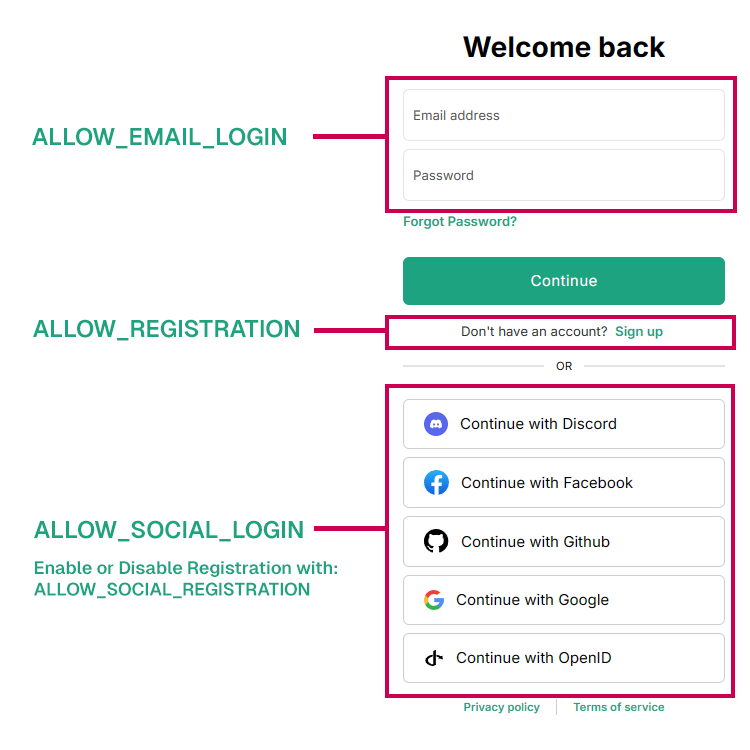
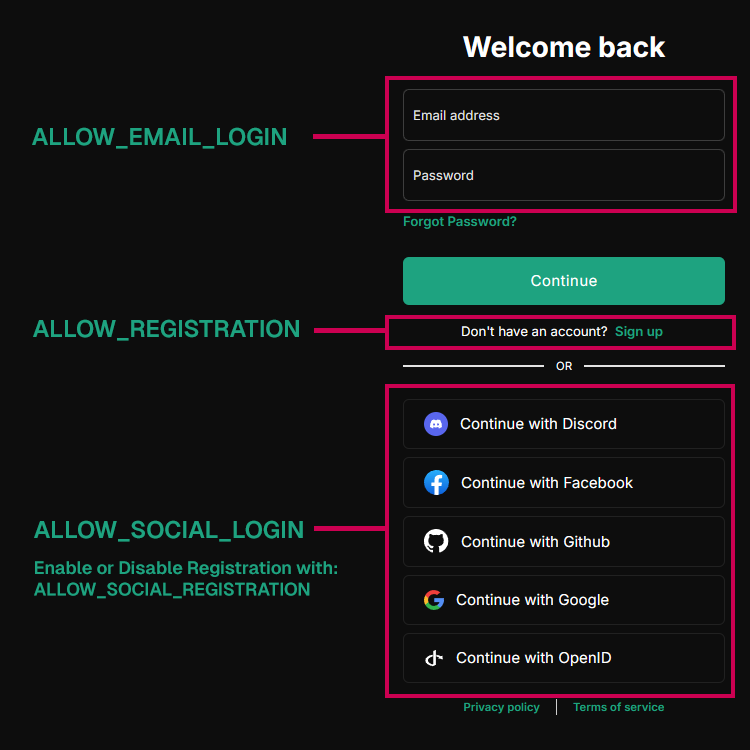
| ALLOW_EMAIL_LOGIN | boolean | Enable or disable ONLY email login. | ALLOW_EMAIL_LOGIN=true |
| ALLOW_REGISTRATION | boolean | Enable or disable Email registration of new users. | ALLOW_REGISTRATION=true |
| ALLOW_SOCIAL_LOGIN | boolean | Allow users to connect to IntelliAsk with various social networks. | ALLOW_SOCIAL_LOGIN=false |
| ALLOW_SOCIAL_REGISTRATION | boolean | Enable or disable registration of new users using various social networks. | ALLOW_SOCIAL_REGISTRATION=false |
| ALLOW_PASSWORD_RESET | boolean | Enable or disable the ability for users to reset their password by themselves | ALLOW_PASSWORD_RESET=false |
| ALLOW_ACCOUNT_DELETION | boolean | Enable or disable the ability for users to delete their account by themselves. Enabled by default if omitted/commented out | ALLOW_ACCOUNT_DELETION=true |
| ALLOW_UNVERIFIED_EMAIL_LOGIN | boolean | Set to true to allow users to log in without verifying their email address. If set to false, users will be required to verify their email before logging in. | ALLOW_UNVERIFIED_EMAIL_LOGIN=true |
| MIN_PASSWORD_LENGTH | number | Minimum password length for user authentication. When using LDAP authentication, you may want to set this to 1 to bypass local password validation, as LDAP servers handle their own password policies. | MIN_PASSWORD_LENGTH=8 |
Quick Tip: Even with registration disabled, add users directly to the database using
npm run create-user. Quick Tip: With registration disabled, you can delete a user withnpm run delete-user email@domain.com.
- Session and Refresh Token Settings:
| Key | Type | Description | Example |
|---|---|---|---|
| SESSION_EXPIRY | integer (milliseconds) | Session expiry time. | SESSION_EXPIRY=1000 * 60 * 15 |
| REFRESH_TOKEN_EXPIRY | integer (milliseconds) | Refresh token expiry time. | REFRESH_TOKEN_EXPIRY=(1000 * 60 * 60 * 24) * 7 |
| SESSION_COOKIE_SECURE | boolean | Overrides the Secure attribute for session/auth cookies. Leave unset to use the default NODE_ENV/DOMAIN_SERVER heuristic. | # SESSION_COOKIE_SECURE=false |
- JWT Settings:
You should use new secure values. The examples given are 32-byte keys (64 characters in hex). Use this replit to generate some quickly: JWT Keys
| Key | Type | Description | Example |
|---|---|---|---|
| JWT_SECRET | string (hex) | JWT secret key. | JWT_SECRET=16f8c0ef4a5d391b26034086c628469d3f9f497f08163ab9b40137092f2909ef |
| JWT_REFRESH_SECRET | string (hex) | JWT refresh secret key. | JWT_REFRESH_SECRET=eaa5191f2914e30b9387fd84e254e4ba6fc51b4654968a9b0803b456a54b8418 |
Social Logins
For more details: OAuth2-OIDC
Apple Authentication
For more information: Apple Authentication
| Key | Type | Description | Example |
|---|---|---|---|
| APPLE_CLIENT_ID | string | Your Apple Services ID (e.g., com.yourdomain.intelliask.services). | APPLE_CLIENT_ID=com.yourdomain.intelliask.services |
| APPLE_TEAM_ID | string | Your Apple Developer Team ID. | APPLE_TEAM_ID=YOUR_TEAM_ID |
| APPLE_KEY_ID | string | Your Apple Key ID from the downloaded key. | APPLE_KEY_ID=YOUR_KEY_ID |
| APPLE_PRIVATE_KEY_PATH | string | Absolute path to your downloaded .p8 file. | APPLE_PRIVATE_KEY_PATH=/path/to/AuthKey.p8 |
| APPLE_CALLBACK_URL | string | The callback URL for Apple authentication. | APPLE_CALLBACK_URL=/oauth/apple/callback |
Discord Authentication
For more information: Discord
| Key | Type | Description | Example |
|---|---|---|---|
| DISCORD_CLIENT_ID | string | Your Discord client ID. | DISCORD_CLIENT_ID= |
| DISCORD_CLIENT_SECRET | string | Your Discord client secret. | DISCORD_CLIENT_SECRET= |
| DISCORD_CALLBACK_URL | string | The callback URL for Discord authentication. | DISCORD_CALLBACK_URL=/oauth/discord/callback |
Facebook Authentication
For more information: Facebook Authentication
| Key | Type | Description | Example |
|---|---|---|---|
| FACEBOOK_CLIENT_ID | string | Your Facebook client ID. | FACEBOOK_CLIENT_ID= |
| FACEBOOK_CLIENT_SECRET | string | Your Facebook client secret. | FACEBOOK_CLIENT_SECRET= |
| FACEBOOK_CALLBACK_URL | string | The callback URL for Facebook authentication. | FACEBOOK_CALLBACK_URL=/oauth/facebook/callback |
GitHub Authentication
For more information: GitHub Authentication
| Key | Type | Description | Example |
|---|---|---|---|
| GITHUB_CLIENT_ID | string | Your GitHub client ID. | GITHUB_CLIENT_ID= |
| GITHUB_CLIENT_SECRET | string | Your GitHub client secret. | GITHUB_CLIENT_SECRET= |
| GITHUB_CALLBACK_URL | string | The callback URL for GitHub authentication. | GITHUB_CALLBACK_URL=/oauth/github/callback |
| GITHUB_ENTERPRISE_BASE_URL | string | Optional: The base URL for your GitHub Enterprise instance. | GITHUB_ENTERPRISE_BASE_URL= |
| GITHUB_ENTERPRISE_USER_AGENT | string | Optional: The user agent for GitHub Enterprise requests. | GITHUB_ENTERPRISE_USER_AGENT= |
Google Authentication
For more information: Google Authentication
| Key | Type | Description | Example |
|---|---|---|---|
| GOOGLE_CLIENT_ID | string | Your Google client ID. | GOOGLE_CLIENT_ID= |
| GOOGLE_CLIENT_SECRET | string | Your Google client secret. | GOOGLE_CLIENT_SECRET= |
| GOOGLE_CALLBACK_URL | string | The callback URL for Google authentication. | GOOGLE_CALLBACK_URL=/oauth/google/callback |
OpenID Connect
For more information:
| Key | Type | Description | Example |
|---|---|---|---|
| OPENID_CLIENT_ID | string | Your OpenID client ID. | OPENID_CLIENT_ID= |
| OPENID_CLIENT_SECRET | string | Your OpenID client secret. | OPENID_CLIENT_SECRET= |
| OPENID_ISSUER | string | The OpenID issuer URL. | OPENID_ISSUER= |
| OPENID_SESSION_SECRET | string | The secret for OpenID session storage. | OPENID_SESSION_SECRET= |
| OPENID_SCOPE | string | The OpenID scope. | OPENID_SCOPE="openid profile email" |
| OPENID_CALLBACK_URL | string | The callback URL for OpenID authentication. | OPENID_CALLBACK_URL=/oauth/openid/callback |
| OPENID_AUDIENCE | string | Audience value for OpenID JWT validation and authorization requests. Comma-separated values are accepted for JWT validation; authorization requests use the first non-empty value. Required for Auth0 when using OPENID_REUSE_TOKENS=true to receive JWT access tokens instead of opaque tokens. | OPENID_AUDIENCE=https://api.intelliask.com |
| OPENID_REQUIRED_ROLE | string | The required role(s) for validation. Supports a single role or multiple comma-separated roles. When multiple roles are specified, the user needs ANY of the specified roles (OR logic). | OPENID_REQUIRED_ROLE=admin or OPENID_REQUIRED_ROLE=role1,role2,admin |
| OPENID_REQUIRED_ROLE_TOKEN_KIND | string | The token kind for required role validation. | OPENID_REQUIRED_ROLE_TOKEN_KIND= |
| OPENID_REQUIRED_ROLE_PARAMETER_PATH | string | The parameter path for required role validation. | OPENID_REQUIRED_ROLE_PARAMETER_PATH= |
| OPENID_ADMIN_ROLE | string | The role the user should have in order to be an admin in IntelliAsk. | OPENID_ADMIN_ROLE= |
| OPENID_ADMIN_ROLE_TOKEN_KIND | string | The source of the information for admin role verification. Possible values are: access, id or userinfo. | OPENID_ADMIN_ROLE_TOKEN_KIND= |
| OPENID_ADMIN_ROLE_PARAMETER_PATH | string | The parameter path for required role validation. | OPENID_ADMIN_ROLE_PARAMETER_PATH= |
| OPENID_ROLE_SYNC_ENABLED | boolean | Enable generic OpenID role sync for non-admin roles. ADMIN cannot be assigned by role sync; use OPENID_ADMIN_ROLE for admin elevation. | OPENID_ROLE_SYNC_ENABLED=false |
| OPENID_ROLE_SYNC_API_ENABLED | boolean | Enable API-based role sync helpers. Requires OPENID_ROLE_SYNC_ENABLED=true. | OPENID_ROLE_SYNC_API_ENABLED=false |
| OPENID_ROLE_SYNC_SOURCE | string | Token source for the role claim. Must be one of: access, id, userinfo. Default: id. | OPENID_ROLE_SYNC_SOURCE=id |
| OPENID_ROLE_SYNC_CLAIM | string | Claim path that contains the provider roles or groups. Required when role sync is enabled. | OPENID_ROLE_SYNC_CLAIM= |
| OPENID_ROLE_SYNC_ROLE_PRIORITY | string | Comma-separated IntelliAsk roles ordered from most important to least important. The first matching role is assigned. | OPENID_ROLE_SYNC_ROLE_PRIORITY=Support,User |
| OPENID_ROLE_SYNC_FALLBACK_ROLE | string | IntelliAsk role assigned when no priority role matches. The fallback is authoritative when configured. | OPENID_ROLE_SYNC_FALLBACK_ROLE=USER |
| OPENID_BUTTON_LABEL | string | The label for the OpenID login button. | OPENID_BUTTON_LABEL= |
| OPENID_IMAGE_URL | string | The URL of the OpenID login button image. | OPENID_IMAGE_URL= |
| OPENID_USE_END_SESSION_ENDPOINT | string | Whether to use the Issuer End Session Endpoint as a Logout Redirect | OPENID_USE_END_SESSION_ENDPOINT=TRUE |
| OPENID_AUTO_REDIRECT | boolean | Whether to automatically redirect to the OpenID provider. | OPENID_AUTO_REDIRECT=true |
| OPENID_USE_PKCE | boolean | Use PKCE (Proof Key for Code Exchange) for OpenID authentication. For public clients without a client secret, leave OPENID_CLIENT_SECRET empty and set this to true. | # OPENID_USE_PKCE=true |
| OPENID_POST_LOGOUT_REDIRECT_URI | string | Redirect URI after OpenID logout. Defaults to ${DOMAIN_CLIENT}/login. | # OPENID_POST_LOGOUT_REDIRECT_URI= |
| OPENID_CLOCK_TOLERANCE | number | Clock tolerance in seconds for token validation. Default: 300. | # OPENID_CLOCK_TOLERANCE=300 |
| OPENID_GENERATE_NONCE | boolean | Force the OpenID client to generate a nonce parameter. Required by some identity providers like AWS Cognito (especially with federation) and Authentik. | OPENID_GENERATE_NONCE=true |
| DEBUG_OPENID_REQUESTS | boolean | Enable detailed logging of OpenID request headers. When disabled (default), only request URLs are logged at debug level. When enabled, request headers are also logged (with sensitive data masked) for deeper debugging of authentication issues. | DEBUG_OPENID_REQUESTS=false |
| OPENID_USERNAME_CLAIM | string | The user info property from the OpenID provider to store as the user's username. | OPENID_USERNAME_CLAIM= |
| OPENID_NAME_CLAIM | string | The user info property from the OpenID provider to store as the user's display name. | OPENID_NAME_CLAIM= |
| OPENID_EMAIL_CLAIM | string | The user info claim to use as the email/identifier for user matching (e.g., "upn" for Entra ID). When not set, defaults to: email → preferred_username → upn. | OPENID_EMAIL_CLAIM= |
OpenID role sync
OPENID_ROLE_SYNC_CLAIM is required when role sync is enabled.
OPENID_ROLE_SYNC_API_ENABLED=true also requires OPENID_ROLE_SYNC_ENABLED=true. Generic role
sync cannot assign ADMIN; use OPENID_ADMIN_ROLE for admin elevation.
OpenID Connect Token Reuse
IntelliAsk supports reusing access and refresh tokens issued by your OpenID Connect provider (like Azure Entra ID or Auth0) to manage user authentication state. When this feature is active, the refresh token passed to the user as a cookie is issued by your OpenID provider instead of IntelliAsk.
| Key | Type | Description | Example |
|---|---|---|---|
| OPENID_REUSE_TOKENS | boolean | Enable reuse of OpenID provider tokens for session management. | OPENID_REUSE_TOKENS=false |
| OPENID_SCOPE | string | Space-separated list of OpenID scopes. Must include offline_access for token reuse. | OPENID_SCOPE=api://intelliask/.default openid profile email offline_access |
| OPENID_AUDIENCE | string | Audience value for OpenID JWT validation and authorization requests. Comma-separated values are accepted for JWT validation; authorization requests use the first non-empty value. Required for Auth0 when OPENID_REUSE_TOKENS=true. See the note in the main OpenID section above. | OPENID_AUDIENCE=https://api.intelliask.com |
| OPENID_REUSE_MAX_SESSION_AGE_MS | number | Maximum age a reused OpenID session token is served before IntelliAsk forces an IdP refresh. Default: 900000 ms / 15 minutes. | OPENID_REUSE_MAX_SESSION_AGE_MS=900000 |
| OPENID_JWKS_URL_CACHE_ENABLED | boolean | Enable caching of signing key verification results. | OPENID_JWKS_URL_CACHE_ENABLED=true |
| OPENID_JWKS_URL_CACHE_TIME | number | Cache duration in milliseconds (default: 600000 ms / 10 minutes). | OPENID_JWKS_URL_CACHE_TIME=600000 |
| OPENID_ON_BEHALF_FLOW_FOR_USERINFO_REQUIRED | boolean | Enable on-behalf-of flow for user info. | OPENID_ON_BEHALF_FLOW_FOR_USERINFO_REQUIRED=true |
| OPENID_ON_BEHALF_FLOW_USERINFO_SCOPE | string | Scope for user info in on-behalf-of flow. | OPENID_ON_BEHALF_FLOW_USERINFO_SCOPE=user.read |
| OPENID_USE_END_SESSION_ENDPOINT | boolean | Enable use of the end session endpoint for logout. | OPENID_USE_END_SESSION_ENDPOINT=true |
OPENID_REUSE_MAX_SESSION_AGE_MS accepts arithmetic expressions like SESSION_EXPIRY. Increase it toward the IdP access-token lifetime when your provider revokes the previous access token on refresh, so downstream consumers such as MCP servers can finish using a still-valid bearer token.
Note
For detailed configuration steps and prerequisites, see Re-use OpenID Tokens for Login Session.
Microsoft Graph API / Entra ID Integration
When using Azure Entra ID (formerly Azure AD) as your OpenID provider, you can enable additional Microsoft Graph API features for enhanced people and group search capabilities within the permissions and sharing system.
| Key | Type | Description | Example |
|---|---|---|---|
| USE_ENTRA_ID_FOR_PEOPLE_SEARCH | boolean | Enable Entra ID people search integration in permissions/sharing system. When enabled, the people picker will search both local database and Entra ID. | USE_ENTRA_ID_FOR_PEOPLE_SEARCH=false |
| ENTRA_ID_INCLUDE_OWNERS_AS_MEMBERS | boolean | When enabled, Entra ID group owners will be considered as members of the group. | ENTRA_ID_INCLUDE_OWNERS_AS_MEMBERS=false |
| OPENID_GRAPH_SCOPES | string | Microsoft Graph API scopes needed for people/group search. Default scopes provide access to user profiles and group memberships. | OPENID_GRAPH_SCOPES=User.Read,People.Read,GroupMember.Read.All,User.ReadBasic.All |
Important Prerequisites
- You must have Azure Entra ID configured as your OpenID provider - OpenID token reuse MUST be
enabled (
OPENID_REUSE_TOKENS=true) - this feature will not work without it - Your Azure app registration must have the appropriate Microsoft Graph API permissions - For group search functionality, admin consent may be required for certain Graph API scopes
SharePoint Integration
IntelliAsk supports direct integration with SharePoint Online and OneDrive for Business, allowing users to select and attach files from their SharePoint libraries directly within conversations. This enterprise feature leverages the existing Azure Entra ID authentication.
| Key | Type | Description | Example |
|---|---|---|---|
| ENABLE_SHAREPOINT_FILEPICKER | boolean | Enable SharePoint file picker in chat and agent panels. When enabled, adds "From SharePoint" option in file attachment menu. | ENABLE_SHAREPOINT_FILEPICKER=true |
| SHAREPOINT_BASE_URL | string | SharePoint tenant base URL. Required when SharePoint integration is enabled. | SHAREPOINT_BASE_URL=https://yourtenant.sharepoint.com |
| SHAREPOINT_PICKER_SHAREPOINT_SCOPE | string | SharePoint-specific OAuth scope for the file picker. Used for authentication when opening the SharePoint file picker interface. | SHAREPOINT_PICKER_SHAREPOINT_SCOPE=https://yourtenant.sharepoint.com/AllSites.Read |
| SHAREPOINT_PICKER_GRAPH_SCOPE | string | Microsoft Graph API scope for file downloads. Used for downloading files from SharePoint after selection. | SHAREPOINT_PICKER_GRAPH_SCOPE=Files.Read.All |
Critical Requirements
All of the following must be configured for SharePoint integration to work:
- Azure Entra ID authentication must be fully configured
OPENID_REUSE_TOKENS=trueis mandatory (uses on-behalf-of token flow)OPENID_SCOPEmust include your IntelliAsk app API scope, for exampleapi://<client-id>/access_as_userOPENID_ON_BEHALF_FLOW_FOR_USERINFO_REQUIRED=trueis required when using that app-audience scope with Azure Entra ID- Your Azure app registration must have SharePoint and Graph API permissions
- Your Azure app registration must expose the IntelliAsk API scope used in
OPENID_SCOPE - All four SharePoint environment variables must be set
- HTTPS is required in production environments
Feature Capabilities
When enabled, users can: - Access files from SharePoint document libraries and OneDrive for Business - Select multiple files at once (default max: 10 files) - See real-time download progress
- Files are downloaded and attached to the conversation like regular uploads
For detailed SharePoint configuration instructions, see: SharePoint Integration Guide
SAML
For more information:
Mutual Exclusion of OpenID and SAML
If OpenID is enabled, SAML authentication will be automatically disabled.
Only one authentication method can be active at a time.
| Key | Type | Description | Example |
|---|---|---|---|
| SAML_ENTRY_POINT | string | The SAML identity provider (IdP) entry point URL. | SAML_ENTRY_POINT= |
| SAML_ISSUER | string | The SAML service provider (SP) entity ID. | SAML_ISSUER= |
| SAML_CERT | string | The SAML signing certificate, provided as a file path or a one-line PEM string. | SAML_CERT= |
| SAML_CALLBACK_URL | string | The callback URL for SAML authentication. | SAML_CALLBACK_URL=/oauth/saml/callback |
| SAML_SESSION_SECRET | string | The secret for SAML session storage. | SAML_SESSION_SECRET= |
| SAML_EMAIL_CLAIM | string | <Optional>: The attribute in the SAML assertion containing the user email. (default: email) | SAML_EMAIL_CLAIM= |
| SAML_USERNAME_CLAIM | string | <Optional>: The attribute in the SAML assertion containing the username. (default: username) | SAML_USERNAME_CLAIM= |
| SAML_GIVEN_NAME_CLAIM | string | <Optional>: The attribute in the SAML assertion containing the given name. (default: given_name) | SAML_GIVEN_NAME_CLAIM= |
| SAML_FAMILY_NAME_CLAIM | string | <Optional>: The attribute in the SAML assertion containing the family name. (default: family_name) | SAML_FAMILY_NAME_CLAIM= |
| SAML_PICTURE_CLAIM | string | <Optional>: The attribute in the SAML assertion containing the profile picture URL. (default: picture) | SAML_PICTURE_CLAIM= |
| SAML_NAME_CLAIM | string | <Optional>: The attribute in the SAML assertion containing the full name. | SAML_NAME_CLAIM= |
| SAML_BUTTON_LABEL | string | <Optional>: The label for the SAML login button. | SAML_BUTTON_LABEL= |
| SAML_IMAGE_URL | string | <Optional>: The URL of the SAML login button image. | SAML_IMAGE_URL= |
| SAML_USE_AUTHN_RESPONSE_SIGNED | boolean | <Optional>: If "true", signs the entire SAML Response. Otherwise, only the Assertion is signed (default). | SAML_USE_AUTHN_RESPONSE_SIGNED= |
LDAP/AD Authentication
For more information: LDAP/AD Authentication
| Key | Type | Description | Example |
|---|---|---|---|
| LDAP_URL | string | LDAP server URL. | LDAP_URL=ldap://localhost:389 |
| LDAP_BIND_DN | string | Bind DN | LDAP_BIND_DN=cn=root |
| LDAP_BIND_CREDENTIALS | string | Password for bindDN | LDAP_BIND_CREDENTIALS=password |
| LDAP_USER_SEARCH_BASE | string | LDAP user search base | LDAP_USER_SEARCH_BASE=o=users,o=example.com |
| LDAP_SEARCH_FILTER | string | LDAP search filter | LDAP_SEARCH_FILTER=mail={{username}} |
| LDAP_CA_CERT_PATH | string | CA certificate path. | LDAP_CA_CERT_PATH=/path/to/root_ca_cert.crt |
| LDAP_TLS_REJECT_UNAUTHORIZED | string | LDAP TLS verification | LDAP_TLS_REJECT_UNAUTHORIZED=true |
| LDAP_STARTTLS | string | Enable LDAP StartTLS for upgrading the connection to TLS. Set to true to enable this feature. | LDAP_STARTTLS=true |
| LDAP_LOGIN_USES_USERNAME | boolean | Use username instead of email for LDAP login. | # LDAP_LOGIN_USES_USERNAME=true |
| LDAP_ID | string | LDAP attribute for unique user ID. Default: uid or sAMAccountName, mail. | # LDAP_ID=uid |
| LDAP_USERNAME | string | LDAP attribute for username. Default: givenName or mail. | # LDAP_USERNAME=givenName |
| LDAP_EMAIL | string | LDAP attribute for email. Default: mail. | # LDAP_EMAIL=userPrincipalName |
| LDAP_FULL_NAME | string | LDAP attribute(s) for full name. Can be comma-separated. Default: givenName + surname. | # LDAP_FULL_NAME=givenName,surname |
Password Reset
Email is used for account verification and password reset. IntelliAsk supports both Mailgun API and traditional SMTP services. See: Email setup
Important Note: You must configure either Mailgun (recommended for servers that block SMTP) or SMTP for email to work.
Warning: Failing to set valid values for either Mailgun or SMTP will result in IntelliAsk using the unsecured password reset!
Mailgun Configuration (Recommended)
Mailgun is particularly useful for deployments on servers that block SMTP ports. When both MAILGUN_API_KEY and MAILGUN_DOMAIN are set, IntelliAsk will use Mailgun instead of SMTP.
| Key | Type | Description | Example |
|---|---|---|---|
| MAILGUN_API_KEY | string | Your Mailgun API key (required for Mailgun). | MAILGUN_API_KEY= |
| MAILGUN_DOMAIN | string | Your Mailgun domain (required for Mailgun). | MAILGUN_DOMAIN=mg.yourdomain.com |
| MAILGUN_HOST | string | Custom Mailgun API host (optional). Use https://api.eu.mailgun.net for EU region. | MAILGUN_HOST=https://api.mailgun.net |
| EMAIL_FROM | string | From email address. Required. | EMAIL_FROM=noreply@intelliask.com.mt |
| EMAIL_FROM_NAME | string | From name (defaults to APP_TITLE if not set). | EMAIL_FROM_NAME= |
SMTP Configuration
If Mailgun is not configured, IntelliAsk will fall back to SMTP settings.
Warning: If using
EMAIL_SERVICE, do NOT set the extended connection parameters: HOST, PORT, ENCRYPTION, ENCRYPTION_HOSTNAME, ALLOW_SELFSIGNED.
See: nodemailer well-known-services
| Key | Type | Description | Example |
|---|---|---|---|
| EMAIL_SERVICE | string | Email service (e.g., Gmail, Outlook). | EMAIL_SERVICE= |
| EMAIL_HOST | string | Mail server host. | EMAIL_HOST= |
| EMAIL_PORT | number | Mail server port. | EMAIL_PORT=25 |
| EMAIL_ENCRYPTION | string | Encryption method (starttls, tls, etc.). | EMAIL_ENCRYPTION= |
| EMAIL_ENCRYPTION_HOSTNAME | string | Hostname for encryption. | EMAIL_ENCRYPTION_HOSTNAME= |
| EMAIL_ALLOW_SELFSIGNED | boolean | Allow self-signed certificates. | EMAIL_ALLOW_SELFSIGNED= |
| EMAIL_USERNAME | string | Username for authentication. | EMAIL_USERNAME= |
| EMAIL_PASSWORD | string | Password for authentication. | EMAIL_PASSWORD= |
| EMAIL_FROM_NAME | string | From name. | EMAIL_FROM_NAME= |
| EMAIL_FROM | string | From email address. Required. | EMAIL_FROM=noreply@intelliask.com.mt |
Firebase CDN
See: Firebase CDN Configuration
Important
- If you are using Firebase as your file storage strategy, set
fileStrategyorfileStrategiestofirebasein yourintelliask.yamlconfiguration file. For more information on configuring theintelliask.yamlfile, please refer to the YAML Configuration Guide: Custom Endpoints & Configuration
| Key | Type | Description | Example |
|---|---|---|---|
| FIREBASE_API_KEY | string | The API key for your Firebase project. | FIREBASE_API_KEY= |
| FIREBASE_AUTH_DOMAIN | string | The Firebase Auth domain for your project. | FIREBASE_AUTH_DOMAIN= |
| FIREBASE_PROJECT_ID | string | The ID of your Firebase project. | FIREBASE_PROJECT_ID= |
| FIREBASE_STORAGE_BUCKET | string | The Firebase Storage bucket for your project. | FIREBASE_STORAGE_BUCKET= |
| FIREBASE_MESSAGING_SENDER_ID | string | The Firebase Cloud Messaging sender ID. | FIREBASE_MESSAGING_SENDER_ID= |
| FIREBASE_APP_ID | string | The Firebase App ID for your project. | FIREBASE_APP_ID= |
Amazon S3 and CloudFront
See: Amazon S3 Configuration and CloudFront with S3
Important
If you are using S3 as your file storage strategy, set fileStrategy or fileStrategies in your
intelliask.yaml configuration file. If you use CloudFront, S3 is still required as the storage
origin.
| Key | Type | Description | Example |
|---|---|---|---|
| AWS_ACCESS_KEY_ID | string | Your IAM user access key ID. Optional if using IRSA. | AWS_ACCESS_KEY_ID=your_access_key_id |
| AWS_SECRET_ACCESS_KEY | string | Your IAM user secret access key. Optional if using IRSA. | AWS_SECRET_ACCESS_KEY=your_secret_access_key |
| AWS_REGION | string | The AWS region where your S3 bucket is located. | AWS_REGION=us-east-1 |
| AWS_BUCKET_NAME | string | The name of the S3 bucket for file storage. | AWS_BUCKET_NAME=your_bucket_name |
| AWS_ENDPOINT_URL | string | Custom AWS endpoint URL (optional). For S3-compatible services. Include the URL scheme, such as https://a7g8.da.idrivee2-32.com. | # AWS_ENDPOINT_URL=https://your_endpoint_url |
| AWS_FORCE_PATH_STYLE | boolean | Set to true for S3-compatible providers that require path-style URLs (e.g. MinIO, Hetzner, Backblaze B2). Not needed for AWS S3. Default: false. | # AWS_FORCE_PATH_STYLE=false |
| CLOUDFRONT_KEY_PAIR_ID | string | CloudFront public key pair ID. Required for signed cookies and signed CloudFront download URLs. | # CLOUDFRONT_KEY_PAIR_ID=K1234567890ABC |
| CLOUDFRONT_PRIVATE_KEY | string | CloudFront private key PEM. Required for signed cookies and signed CloudFront download URLs. Preserve PEM newlines when injecting this secret. | # CLOUDFRONT_PRIVATE_KEY="-----BEGIN RSA PRIVATE KEY-----\n...\n-----END RSA PRIVATE KEY-----" |
Note: For Kubernetes deployments (e.g., on EKS), you can use IRSA (IAM Roles for Service Accounts) instead of providing explicit credentials. In that case, only
AWS_REGIONandAWS_BUCKET_NAMEare required.
Azure Blob Storage CDN
See: Azure Blob Storage CDN Configuration
Important
If you are using Azure Blob Storage as your file storage strategy, set fileStrategy or
fileStrategies to azure_blob in your intelliask.yaml configuration file.
| Key | Type | Description | Example |
|---|---|---|---|
| AZURE_STORAGE_CONNECTION_STRING | string | Azure Blob Storage connection string. Use this OR AZURE_STORAGE_ACCOUNT_NAME for Managed Identity. | AZURE_STORAGE_CONNECTION_STRING=DefaultEndpointsProtocol=https;AccountName=... |
| AZURE_STORAGE_ACCOUNT_NAME | string | Azure Storage account name. Use for Managed Identity authentication (do not set connection string). | # AZURE_STORAGE_ACCOUNT_NAME=yourAccountName |
| AZURE_STORAGE_PUBLIC_ACCESS | boolean | Enable public access for blobs. Default: false. | AZURE_STORAGE_PUBLIC_ACCESS=false |
| AZURE_CONTAINER_NAME | string | Container name for file storage. Default: files. | AZURE_CONTAINER_NAME=files |
Note: Use either
AZURE_STORAGE_CONNECTION_STRING(Option A) orAZURE_STORAGE_ACCOUNT_NAMEwith Managed Identity (Option B), not both.
UI
Help and FAQ Button
| Key | Type | Description | Example |
|---|---|---|---|
| HELP_AND_FAQ_URL | string | Help and FAQ URL. If empty or commented, the button is enabled. To disable the Help and FAQ button, set to "/". | HELP_AND_FAQ_URL=https://intelliask.com.mt |
Behaviour:
Sets the Cache-Control headers for static files. These configurations only trigger when the NODE_ENV is set to production.
Properly setting cache headers is crucial for optimizing the performance and efficiency of your web application. By controlling how long browsers and CDNs store copies of your static files, you can significantly reduce server load, decrease page load times, and improve the overall user experience.
- Uncomment
STATIC_CACHE_MAX_AGEto change themax-agefor static files. By default this is set to 4 weeks. - Uncomment
STATIC_CACHE_S_MAX_AGEto change thes-maxagefor static files. By default this is set to 1 week.- This is for the shared cache, which is used by CDNs and proxies.
App Title and Footer
| Key | Type | Description | Example |
|---|---|---|---|
| APP_TITLE | string | App title. | APP_TITLE=IntelliAsk |
| CUSTOM_FOOTER | string | Custom footer. | # CUSTOM_FOOTER="My custom footer" |
| TEMP_CHAT_RETENTION_HOURS | number | **Deprecated:** Use `interface.temporaryChatRetention` in intelliask.yaml instead. Hours to retain temporary chats. Default: 720 (30 days). | # TEMP_CHAT_RETENTION_HOURS=168 |
Behaviour:
- Uncomment
CUSTOM_FOOTERto add a custom footer. - Uncomment and leave
CUSTOM_FOOTERempty to remove the footer. - You can now add one or more links in the CUSTOM_FOOTER value using the following format:
[Anchor text](URL). Each link should be delineated with a pipe (|).
Markdown example:
CUSTOM_FOOTER=[Link 1](http://example1.com) | [Link 2](http://example2.com)
Birthday Hat
| Key | Type | Description | Example |
|---|---|---|---|
| SHOW_BIRTHDAY_ICON | boolean | Show the birthday hat icon. | # SHOW_BIRTHDAY_ICON=true |
Behaviour:
- The birthday hat icon will show automatically on March 1st (IntelliAsk's birthday).
- Set
SHOW_BIRTHDAY_ICONtofalseto disable the birthday hat. - Set
SHOW_BIRTHDAY_ICONtotrueto enable the birthday hat all the time.
Analytics
Google Tag Manager
IntelliAsk supports Google Tag Manager for analytics. You will need a Google Tag Manager ID to enable it in IntelliAsk. Follow this guide to generate a Google Tag Manager ID and configure Google Analytics. Then set the ANALYTICS_GTM_ID environment variable to your Google Tag Manager ID.
Note: If ANALYTICS_GTM_ID is not set, Google Tag Manager will not be enabled. If it is set incorrectly, you will see failing requests to gtm.js
| Key | Type | Description | Example |
|---|---|---|---|
| ANALYTICS_GTM_ID | string | Google Tag Manager ID. | ANALYTICS_GTM_ID= |
Conversation Import
Configure limits for conversation file imports to prevent memory issues.
| Key | Type | Description | Example |
|---|---|---|---|
| CONVERSATION_IMPORT_MAX_FILE_SIZE_BYTES | number | Maximum file size in bytes for conversation imports. Default: 0 (no limit enforced). Example: 262144000 (250 MiB). | # CONVERSATION_IMPORT_MAX_FILE_SIZE_BYTES=262144000 |
MCP (Model Context Protocol)
Configure Model Context Protocol settings for enhanced server management and OAuth support.
MCP Server Configuration
| Key | Type | Description | Example |
|---|---|---|---|
| MCP_OAUTH_ON_AUTH_ERROR | boolean | Treat 401/403 responses as OAuth requirement when no oauth metadata found. | MCP_OAUTH_ON_AUTH_ERROR=true |
| MCP_OAUTH_DETECTION_TIMEOUT | number | Timeout for OAuth detection requests in milliseconds. | MCP_OAUTH_DETECTION_TIMEOUT=5000 |
| MCP_OAUTH_HANDLING_TIMEOUT | number | How long IntelliAsk waits for a user to complete an MCP OAuth flow before timing out. Default: 600000 ms (10 minutes). | MCP_OAUTH_HANDLING_TIMEOUT=600000 |
| MCP_OAUTH_FLOW_TTL | number | How long MCP OAuth flow state is retained. IntelliAsk clamps this above MCP_OAUTH_HANDLING_TIMEOUT so callbacks near the deadline can still complete. Default: 900000 ms (15 minutes). | MCP_OAUTH_FLOW_TTL=900000 |
| MCP_CONNECTION_CHECK_TTL | number | Cache connection status checks for this many milliseconds to avoid expensive verification. | MCP_CONNECTION_CHECK_TTL=30000 |
| MCP_SKIP_CODE_CHALLENGE_CHECK | boolean | Skip code challenge method validation. When set to true, forces S256 code challenge even if not advertised in .well-known/openid-configuration | MCP_SKIP_CODE_CHALLENGE_CHECK=false |
| MCP_STREAMABLE_HTTP_MAX_RESPONSE_BYTES | number | Maximum bytes allowed in a non-GET streamable HTTP MCP response before rejecting it. Set to 0 to disable. Default: 16777216 (16 MiB). | # MCP_STREAMABLE_HTTP_MAX_RESPONSE_BYTES=16777216 |
| MCP_STREAMABLE_HTTP_MAX_LINE_BYTES | number | Maximum bytes allowed in one SSE line for non-GET streamable HTTP MCP responses. Set to 0 to disable. Default: 5242880 (5 MiB). | # MCP_STREAMABLE_HTTP_MAX_LINE_BYTES=5242880 |
Other
Redis
Redis provides significant performance improvements and enables horizontal scaling capabilities for IntelliAsk.
Note: Redis support is experimental, and you may encounter some problems when using it.
Important: If using Redis, you should flush the cache after changing any IntelliAsk settings.
For detailed configuration and examples, see: Redis Configuration Guide
| Key | Type | Description | Example |
|---|---|---|---|
| USE_REDIS | boolean | Enable Redis for caching and session storage. When true, REDIS_URI must be provided. | USE_REDIS=true |
| USE_REDIS_STREAMS | boolean | Enable Redis for resumable LLM streams. Defaults to USE_REDIS value if not set. Set to false to use in-memory storage for streams. | # USE_REDIS_STREAMS=true |
| REDIS_URI | string | Redis connection URI. For single instance: redis://host:port. For cluster: comma-separated URIs. | REDIS_URI=redis://127.0.0.1:6379 |
| USE_REDIS_CLUSTER | boolean | Enable Redis cluster mode when using a single URI | # USE_REDIS_CLUSTER="true" |
| REDIS_CLUSTER_SAFE_DELETE | boolean | Delete Redis cache keys individually to avoid CROSSSLOT errors on single-endpoint managed Redis services that shard keys internally. | # REDIS_CLUSTER_SAFE_DELETE=true |
| REDIS_USERNAME | string | Redis username for authentication. Overrides username in URI if both provided. | # REDIS_USERNAME=your_redis_username |
| REDIS_PASSWORD | string | Redis password for authentication. Overrides password in URI if both provided. | # REDIS_PASSWORD=your_redis_password |
| REDIS_CA | string | Path to CA certificate for TLS verification when using rediss:// protocol. | # REDIS_CA=/path/to/ca-cert.pem |
| REDIS_KEY_PREFIX | string | Static prefix for all Redis keys to prevent cross-deployment contamination. | # REDIS_KEY_PREFIX=intelliask-prod-v2 |
| REDIS_KEY_PREFIX_VAR | string | Environment variable name containing dynamic prefix (e.g., K_REVISION for Cloud Run). Cannot be used with REDIS_KEY_PREFIX. | # REDIS_KEY_PREFIX_VAR=K_REVISION |
| REDIS_MAX_LISTENERS | number | Maximum event listeners per Redis client. Prevents memory leaks. Default: 40. | # REDIS_MAX_LISTENERS=40 |
| REDIS_PING_INTERVAL | number | Ping interval in seconds to maintain connections. Default: 0 (disabled). Only set if experiencing timeouts. | # REDIS_PING_INTERVAL=300 |
| FORCED_IN_MEMORY_CACHE_NAMESPACES | string | Comma-separated cache keys to force in-memory storage even when Redis is enabled. | # FORCED_IN_MEMORY_CACHE_NAMESPACES=ROLES,MESSAGES |
| REDIS_USE_ALTERNATIVE_DNS_LOOKUP | boolean | Enable alternate dnsLookup for TLS connections with AWS Elasticache. Required for Elasticache clusters with TLS. | # REDIS_USE_ALTERNATIVE_DNS_LOOKUP=true |
Notes:
- When
USE_REDIS=true, you must provideREDIS_URIor the application will throw an error. - For Redis Cluster mode, provide multiple URIs:
redis://node1:7001,redis://node2:7002,redis://node3:7003(cluster mode is auto-detected). - For single-endpoint managed Redis services that shard keys internally, keep
USE_REDIS_CLUSTER=falseand setREDIS_CLUSTER_SAFE_DELETE=trueif cache clears fail withCROSSSLOTerrors. - Use
rediss://protocol for TLS connections and setREDIS_CAif your CA is not publicly trusted. REDIS_KEY_PREFIX_VARandREDIS_KEY_PREFIXare mutually exclusive.- AWS Elasticache with TLS: Elasticache may need to use an alternate dnsLookup for TLS connections. Set
REDIS_USE_ALTERNATIVE_DNS_LOOKUP=trueif using Elasticache with TLS. See ioredis documentation for more details.
Leader Election
Configure distributed leader election for multi-instance deployments with Redis. Leader election ensures only one instance performs certain operations like scheduled tasks.
| Key | Type | Description | Example |
|---|---|---|---|
| LEADER_LEASE_DURATION | number | Duration in seconds that the leader lease is valid before it expires. Default: 25. | LEADER_LEASE_DURATION=25 |
| LEADER_RENEW_INTERVAL | number | Interval in seconds at which the leader renews its lease. Default: 10. | LEADER_RENEW_INTERVAL=10 |
| LEADER_RENEW_ATTEMPTS | number | Maximum number of retry attempts when renewing the lease fails. Default: 3. | LEADER_RENEW_ATTEMPTS=3 |
| LEADER_RENEW_RETRY_DELAY | number | Delay in seconds between retry attempts when renewing the lease. Default: 0.5. | LEADER_RENEW_RETRY_DELAY=0.5 |
Notes:
- Leader election requires Redis to be enabled (
USE_REDIS=true). - These settings are only relevant for multi-instance deployments.
- The leader lease must be renewed before expiration to maintain leadership.
- If lease renewal fails after max attempts, the instance will relinquish leadership.
Docker Override for Advanced Users
Advanced users only
This section is for advanced users who choose not to use the recommended intelliask binary and instead want full manual control over Docker Compose orchestration.
If you're deploying without the intelliask binary, you have two ways to customize the stack beyond editing config/.env:
Option 1: docker-compose.override.yml (auto-merged)
Create a docker-compose.override.yml file in the config/ directory (same location as the *.compose.yml files). Docker Compose automatically merges this file with the base compose files listed in COMPOSE_FILE.
Option 2: Custom compose file in COMPOSE_FILE
Create your own custom.compose.yml and explicitly add it to the COMPOSE_FILE list in config/.env:
Both approaches let you:
- Override environment variables from
config/.env - Substitute bundled services with your own infrastructure (external S3, managed Redis, cloud PostgreSQL, external reverse proxy, etc.)
- Modify resource limits, ports, networks, or volumes
- Add custom sidecars or monitoring
Example: Using an external S3 bucket instead of the bundled Garage service
Example: Using an external managed Redis
For more info see:
- Our quick guide: Docker Override
- Official Docker documentation:
Recommended approach
For most users, the intelliask binary handles provisioning, secrets, updates, and day-to-day operations without requiring Docker Compose expertise. See First-time Provisioning and Managing the Stack for the guided approach.
Last updated on