Langfuse Tracing
This document explains how to integrate Langfuse tracing with IntelliAsk to get full observability into your AI conversations.
Langfuse is an open-source LLM observability platform that helps you trace, monitor, and debug your LLM applications. By integrating Langfuse with IntelliAsk, you get full visibility into your AI conversations.
Prerequisites
Before you begin, ensure you have:
- A running IntelliAsk instance (see Quick Start)
- A Langfuse account (sign up for free)
- Langfuse API keys from your project settings
Setup
Add the following Langfuse-related environment variables to your .env file in your IntelliAsk installation directory:
| Key | Type | Description | Example |
|---|---|---|---|
| LANGFUSE_PUBLIC_KEY | string | Your Langfuse public key. | LANGFUSE_PUBLIC_KEY=pk-lf-*** |
| LANGFUSE_SECRET_KEY | string | Your Langfuse secret key. | LANGFUSE_SECRET_KEY=sk-lf-*** |
| LANGFUSE_BASE_URL | string | The Langfuse API base URL. | LANGFUSE_BASE_URL=https://cloud.langfuse.com |
| LANGFUSE_PROJECT_ID | string | The Langfuse project ID traces are sent to. Enables deep links to the project from the app. | LANGFUSE_PROJECT_ID=*** |
| LANGFUSE_TRACING_ENABLED | boolean | Master switch for tracing. Set to `false` to disable trace and feedback-score delivery without removing credentials. | LANGFUSE_TRACING_ENABLED=true |
| LANGFUSE_SAMPLE_RATE | number | Deterministic sample rate between 0 and 1. `0` disables sampling; `1` traces every request. | LANGFUSE_SAMPLE_RATE=1 |
Example Configuration
Self-Hosted Langfuse
For self-hosted Langfuse instances, set LANGFUSE_BASE_URL to your custom URL (e.g.,
http://localhost:3000 for local development).
Restart IntelliAsk
After adding the environment variables, restart your IntelliAsk instance to apply the changes:
See Traces in Langfuse
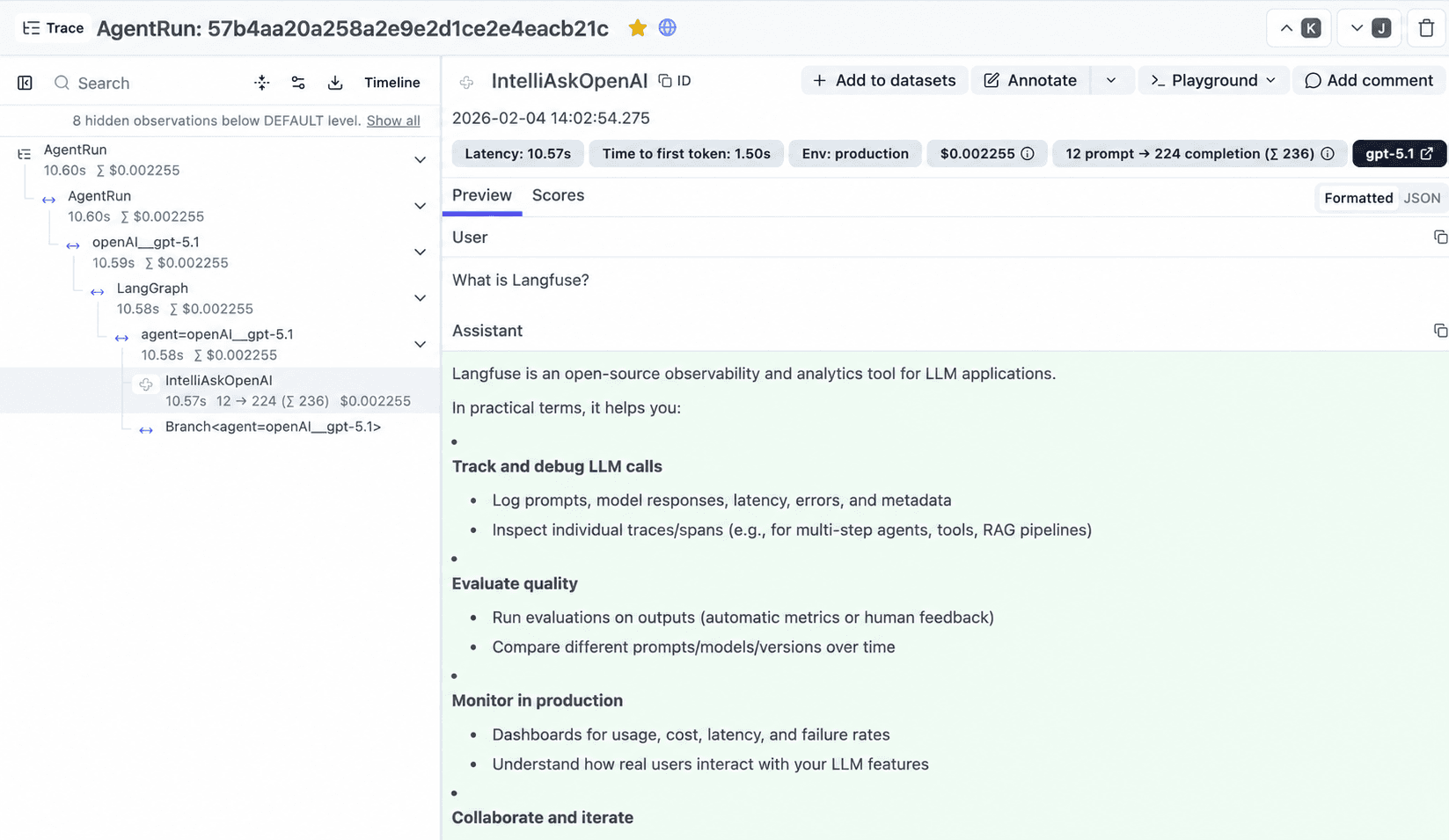
Once IntelliAsk is restarted with Langfuse configured, you will see a new trace for every chat message response in the Langfuse UI:
Message Feedback Scores
When Langfuse tracing is configured, IntelliAsk also sends message feedback to Langfuse as a user-feedback BOOLEAN score on the matching trace. A thumbs-up rating is sent as 1, a thumbs-down rating is sent as 0, and any selected feedback tag or comment is included on the score. Clearing feedback deletes the score.
Feedback scores include message context metadata when available, including the message ID, parent message ID, conversation/session ID, user ID, endpoint, sender, isCreatedByUser, token count, rating, and feedback tag. Empty metadata values are omitted before the score is sent.
Feedback scores use the same Langfuse credentials and base URL as tracing. They also respect LANGFUSE_TRACING_ENABLED=false, LANGFUSE_SAMPLE_RATE=0, and LANGFUSE_TRACING_ENVIRONMENT. Score delivery is best-effort, so the feedback UI does not block if Langfuse is temporarily unavailable.
Multi-tenant configuration
Beyond the environment variables above, IntelliAsk supports a top-level langfuse
object in intelliask.yaml for multi-tenant deployments, where different roles,
groups, or users route traces to different Langfuse projects.
The langfuse object stores the enabled state, the public key, an encrypted
secret key, the verified project ID, a masked secretKeyPreview, and an approved
destination key. Administrators configure and verify a connection through an
admin-only Settings → Langfuse flow, where credentials are verified server-side
before they are saved.
Environment credentials take precedence
In single-tenant deployments, complete environment credentials (LANGFUSE_PUBLIC_KEY,
LANGFUSE_SECRET_KEY, LANGFUSE_BASE_URL) take precedence over the langfuse object.
Fanout availability remains deployment-controlled.
Removed legacy fields
The legacy displaySecretKey and nested fanout.enabled fields have been removed.
Use the encrypted secret key and the deployment-level fanout settings below instead.
Authorized administrators can open a sampled conversation's Langfuse session directly from the Context Usage breakdown.
Fanout deployment
Opt-in fanout lets a deployment export traces to a central collector and to tenant-scoped destinations. Fanout is configured through Compose and Helm deployment settings and the environment variables below.
| Key | Type | Description | Example |
|---|---|---|---|
| LANGFUSE_FANOUT_LISTEN_ADDR | string | Overrides the fanout gateway's default `:4318` listen address. | LANGFUSE_FANOUT_LISTEN_ADDR=:4318 |
| LANGFUSE_FANOUT_CENTRAL_MEDIA_UPLOAD_DISABLED | boolean | Disables app-side media upload creation for central and fallback collector traces, without changing tenant-routed media. | LANGFUSE_FANOUT_CENTRAL_MEDIA_UPLOAD_DISABLED=true |
Deployment-controlled
Fanout availability is controlled at the deployment level. The Compose and Helm fanout settings must be enabled for these variables to take effect.
Last updated on