Code Interpreter API
Execute code securely and manage files seamlessly with IntelliAsk's Code Interpreter API
Introduction
IntelliAsk's Code Interpreter API provides a secure and hassle-free way to execute code and manage files through a simple API interface. Whether you're using it through IntelliAsk's Agents or integrating it directly into your applications, the API offers a powerful sandbox environment for running code in multiple programming languages.
Deep reference
For the complete service reference — architecture, every environment variable, and the security model — see Services → Code Interpreter.
Getting Started
Code Interpreter ships as part of the IntelliAsk stack (the codeapi service). Once it's running, there's nothing for end users to install or configure:
- Deploy the codeapi service with the rest of the stack — see Deploy → Components → Code Interpreter
- The app is already wired to it:
INTELLIASK_CODE_BASEURLpoints at the in-stackcodeapi-apiservice and the signing keys are auto-provisioned — there's no API key to set - Start executing code and generating files securely through IntelliAsk's Agents or the "Run Code" button
Key Features
Supported Languages
Execute code in multiple programming languages:
- Python, Node.js (JS/TS), Go, C/C++, Java, PHP, Rust, Fortran, Rscript
Seamless File Handling
- Upload files for processing
- Download generated outputs
- Secure file management
- Session-based file organization
Security & Convenience
- Secure sandboxed execution environment
- Strong sandbox isolation (NsJail user namespaces)
- No local setup required for end users
- Session-based, isolated file storage
Programmatic Tool Calling
Programmatic Tool Calling lets IntelliAsk Agents route selected MCP tools through the Code Interpreter sandbox. Instead of asking the model to call each tool directly, IntelliAsk provides a Code Interpreter-backed orchestration tool; generated sandbox code can call registered tool stubs, use loops and conditionals, process intermediate results, and return a final answer.
The sandbox still does not receive general network access. Tool calls are brokered through the Code Interpreter Tool Call Server and IntelliAsk's registered tool map, so only tools available to the agent can be called.
Using the API
In IntelliAsk
The API has first-class support in IntelliAsk through these main methods:
-
AI Agents: Enable Code Interpreter in your agent's configuration to allow it to execute code and process files automatically.
-
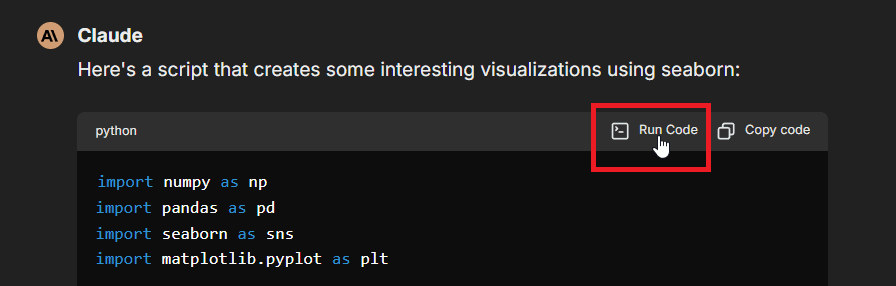
Manual Execution: Use the "Run Code" button in code blocks within the chat interface, as shown here:
-
Programmatic Tool Calling: Enable the
programmatic_toolscapability and mark selected MCP tools as Programmatic so agents can orchestrate those tools from sandboxed code.
Authentication
There is no API key to manage. The IntelliAsk app authenticates to the Code Interpreter with a short-lived Ed25519 JWT that it mints per request; the signing keys are auto-provisioned with the stack. See Services → Code Interpreter → Security for how request authentication and signed execution manifests work.
Core Functionality
Code Execution
- Run code snippets in supported languages
- Receive stdout/stderr output
- Get execution statistics (memory usage, CPU time)
- Handle program arguments
- Access execution status and results
File Operations
- Upload input files
- Download generated outputs
- Preview generated Office, CSV, text, and PDF-like artifacts inline when IntelliAsk can safely extract/render them
- List available files
- Delete unnecessary files
- Manage file sessions
Generated artifact previews are intentionally size-bounded. Set FILE_PREVIEW_MAX_EXTRACT_BYTES in IntelliAsk's .env to change the source-file size limit for inline preview extraction; larger files remain available for download.
Limitations
- Code cannot access the network
- Only 10 files can be generated per run
- Resource limits (RAM per execution, file upload size, and request quotas) depend on how you provision and configure your deployment
Use Cases
- Code Testing: Test code snippets in multiple languages
- File Processing: Transform and analyze files programmatically
- AI Applications: Execute AI-generated code securely
- Development Tools: Build interactive coding environments
- Objective Logic: Verify code logic and correctness, improving AI models
Separate, scalable service
Code execution runs as its own service (the codeapi stack) rather than inside the chat app, which keeps the core IntelliAsk application lightweight and lets the sandbox infrastructure scale independently. It runs as a set of components — an API gateway, sandboxed workers, an egress gateway, a tool-call broker, and a file server — with strong isolation (NsJail user namespaces) so untrusted code runs safely.
For the architecture, the full environment surface, and the security model, see Services → Code Interpreter.
Conclusion
The Code Interpreter API provides a secure, convenient way to execute code and manage files in an isolated sandbox. Used through IntelliAsk's Agents or the "Run Code" button, it offers a robust solution for code execution needs — with no setup required from end users.
Last updated on